
You close your laptop after a long client session and feel the satisfying relief of finishing the actual work. The deliverable is sent, the call is done, or the site visit is complete. But another clock has just started. It measures the time between completed work, invoice delivery, client approval, and money deposited in your account.
That second clock matters more than the stopwatch on your screen. Time tracking invoice software is useful when it removes delays between those stages, not merely when it records another hour. The market has grown into a substantial software category, with one estimate valuing global time tracking software at USD 5.87 billion in 2025 and projecting USD 18.29 billion by 2034, a 13.46% CAGR. The same estimate places Asia Pacific at 37.4% of the market in 2025, which shows that demand extends well beyond North America and Europe (market context from Harvest).
This guide treats hourly billing as plumbing. The timer captures the work, the ledger keeps it organized, the invoice asks for payment, and the payment workflow brings the cash home. The practical question is simple: how many days does your setup remove between finishing a job and getting paid?
The Clock That Starts When the Job Ends
At 6:18 p.m., Maya closes her laptop after finishing a client's website revisions. She remembers the project clearly because she worked on it all afternoon, but she still has to reconstruct the time, separate billable revisions from administrative messages, create an invoice, attach the right details, and send it. Her work clock has stopped. Her cash clock hasn't.
The first clock measures labor. It starts when Maya begins a task and stops when she finishes. The second clock measures accounts receivable latency, the days between completed work and deposited payment. Nothing visible seems to happen during that interval, yet Maya has already delivered the value while waiting to receive the money.
For a solo provider, that gap can feel harmless when invoices are small or clients usually pay. It becomes urgent when several completed jobs sit unbilled, when a client needs another approval step, or when an invoice arrives without a convenient way to pay. A compiled 2026 benchmark estimates a global average of 53 days from invoice to cash, with observed extremes of about 28 days in Germany and 90 days in Greece (freelance payment delay benchmark). Those figures describe the invoice-to-cash interval, but they also clarify why every earlier delay matters.
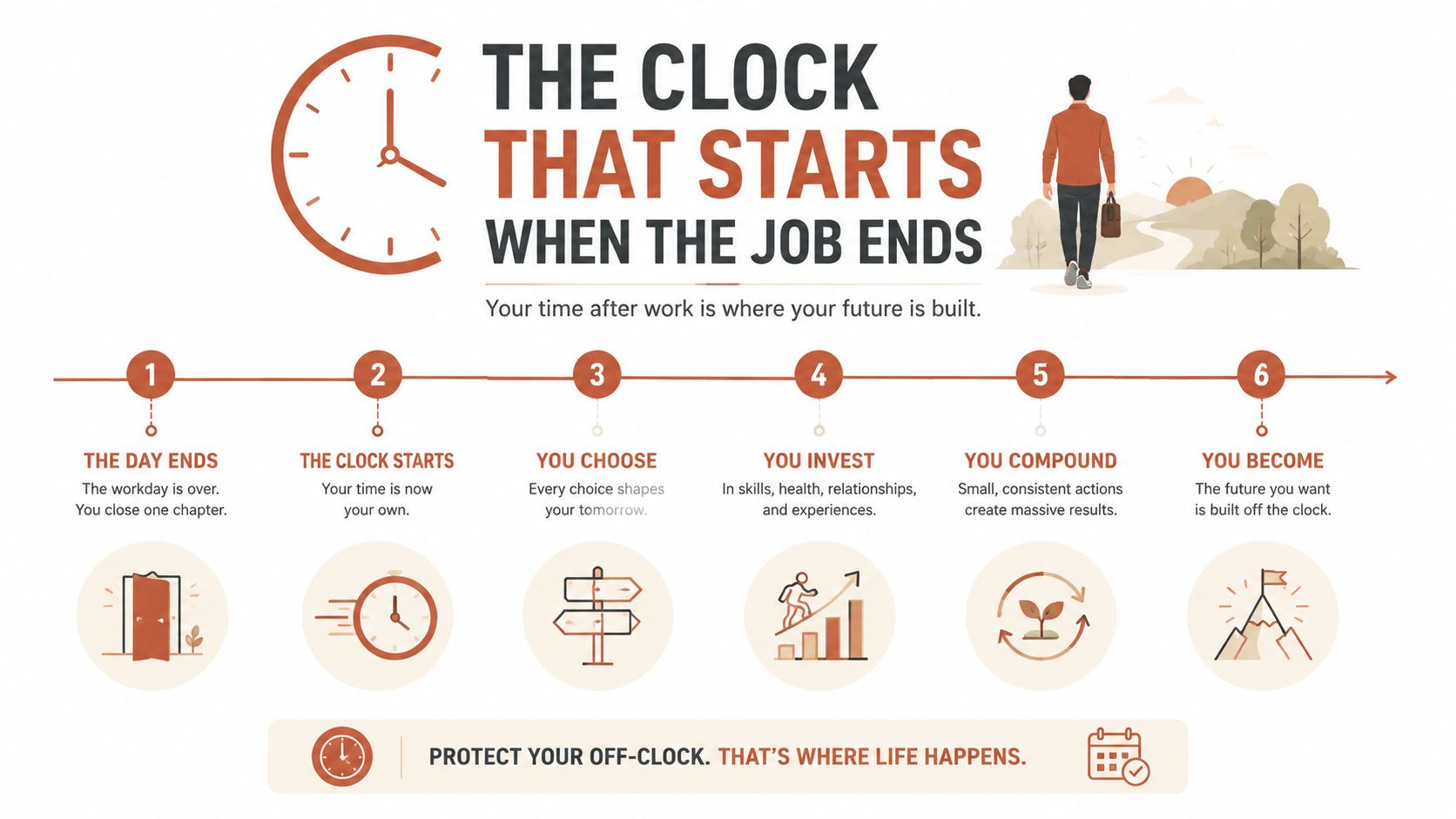
Two clocks, one cash result
The first clock rewards craftsmanship. The second rewards operational follow-through. If you finish work on Monday but don't issue the invoice until Friday, you've added days before the client can even review or pay it. If the invoice arrives as a static attachment and the client must search for payment instructions, the cash clock keeps running.
A useful time tracking workflow should make the handoff almost boring. The hours should already be attached to the correct client and project, the invoice should pull from those entries, and the payment page should be ready when the client opens it.
Practical rule: Judge the system by the distance between “job complete” and “payment received,” not by how polished the stopwatch looks.
The rest of the process follows that second clock. Good software doesn't make time pass faster. It removes avoidable waiting, retyping, missing entries, approval friction, and payment obstacles so your money gets closer to the moment you created the value.
Three Building Blocks of Hourly Billing Software
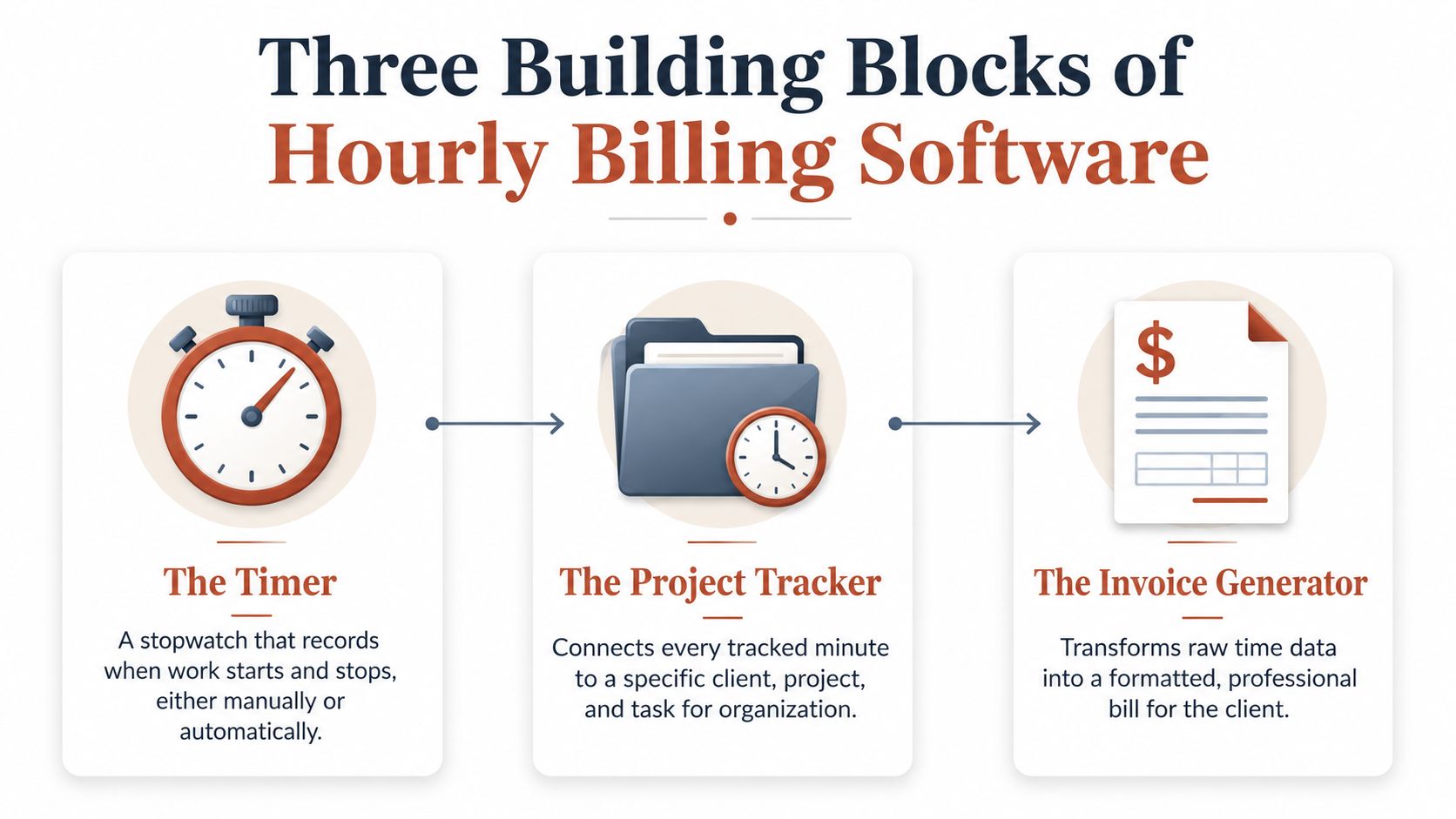
Hourly billing works best when three separate jobs happen in one connected flow. Think of the system as a stopwatch, a notebook, and a checkout document. Each has a distinct purpose, and skipping one creates a gap that you'll eventually fill with memory or manual entry.
The timer captures
The timer is a stopwatch for active work. You start it against a client, project, and task, then stop it when the task ends. Some tools depend on a manual start and stop. Others detect activity on a desktop or mobile device and let you review the captured work afterward.
Manual timing is easy to understand, but it depends on discipline. Automatic capture can reduce the number of moments you have to remember, although it introduces questions about privacy, accuracy, and review. Either way, the timer's job is not to prove that you were busy. It records a usable duration connected to billable work.
The ledger remembers
The hours ledger is the notebook behind the scenes. It stores each entry with information such as:
- Client and project: Where the work belongs.
- Task description: What you did, in language a client can understand.
- Duration: How long the entry lasted.
- Billable status: Whether it should appear on an invoice.
- Rate: Which hourly price applies.
This ledger protects you from the “I know I worked on it, but I can't remember how long” problem. It also lets you correct an entry, add a forgotten block, or review unbilled work before preparing an invoice. A usable tracker should support both real-time entries and manual additions, because interruptions, calls, and forgotten timers are normal parts of freelance work.
The generator charges
The invoice generator turns selected ledger entries into a document a client can approve and pay. It applies the agreed rate, follows the configured rounding rule, groups related entries, and displays a clear description, duration, rate, and amount.
The advantage of integrated time tracking invoice software is that these three components share the same underlying records. You don't have to copy a total from a timer into a spreadsheet, then copy the spreadsheet into an accounting template. That disconnected path creates extra work and gives hours several opportunities to disappear.
Timer captures. Ledger remembers. Generator charges. That's the mental model to keep as you compare products.
From Running Timer to Line Item on the Invoice
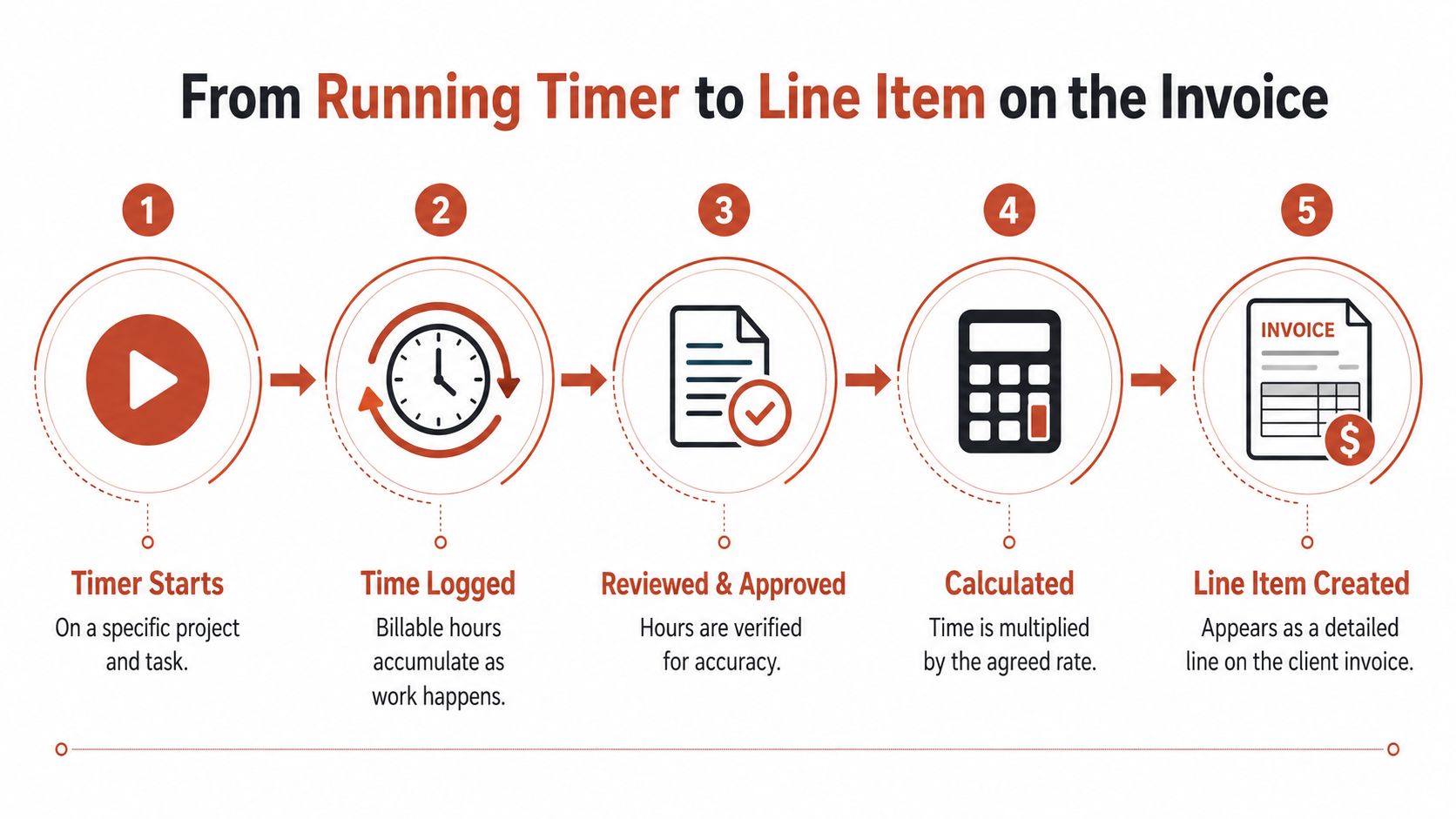
A billable hour doesn't jump directly from a stopwatch into a client bill. It passes through a chain of decisions, and each decision affects what the client sees.
First, start the timer on a specific project and task. “Client work” is too broad to help later. “Homepage revision,” “consulting call,” or “site inspection” gives the entry a useful identity. When you stop the timer, the software records the start time, end time, and duration in the timesheet.
Next, review the entry. Mark it billable if the client should pay for it, or non-billable if it represents internal administration, marketing, or another activity covered by your business rather than the client agreement. A missed classification can produce either an uncomfortable overcharge or an invoice that leaves legitimate work behind.
Rounding is a contract decision
Rounding works like rounding to the nearest nickel at a checkout counter, except the unit is time. A six-minute entry might be rounded to fifteen minutes if that's the rule configured for the project. That setting changes the amount billed, so it should match the agreement you made with the client.
The software should make the rule visible and consistent. You don't want one entry rounded by a timer, another adjusted in a spreadsheet, and a third estimated from memory. Consistency makes the invoice easier to explain and gives you a reliable record for future reviews.
Rates follow the same logic. A system might use a default hourly rate, a project-level override, or a task-specific rate. For example, general consulting could use the standard project rate while specialized technical work uses a separate agreed rate. The important point is that the rate should be assigned before aggregation, not manually typed onto every final line.
Aggregation creates the bill
At the end of the billing period, the software gathers approved, billable entries for the selected client or project. It totals the duration, multiplies time by the applicable rate, and formats the result into line items containing the description, hours, rate, and amount.
A strong invoicing workflow doesn't require you to rekey those details. You review them, adjust an error if needed, and issue the invoice. In a disconnected setup, every handoff from timer to ledger, ledger to spreadsheet, and spreadsheet to invoice creates another place where a duration, task, or rate can be lost.
That path is worth watching closely because the goal isn't just to create a professional-looking PDF. The goal is to move accurate work records into a payable request without adding days or introducing doubts.
Design Choices When Comparing Time Tracking Invoice Tools
The best setup depends less on a universal feature list than on the decisions built into your daily routine. A solo consultant who works at a desk may need different capture methods from a mobile tradesperson or a tutor moving between appointments.
| Decision | Option A | Option B | Trade-off |
|---|---|---|---|
| Capture method | Manual start and stop | Passive desktop or mobile detection | Manual timing offers direct control, while automatic capture reduces forgotten starts but requires review and privacy checks |
| Timer environment | Dedicated app | Spreadsheet or CSV import | A native timer reduces re-entry, while imports can preserve flexibility across existing tools |
| Bundle shape | One all-in-one product | Timer connected to accounting software | An all-in-one flow can reduce handoffs, while connected tools may offer deeper accounting capabilities |
| Pricing posture | Per-seat subscription | Percentage of invoices | Subscription pricing is easier to forecast, while percentage pricing ties cost to billing volume |
Manual capture versus automatic capture
A manual timer behaves like a physical stopwatch. You decide when the work begins and ends, which makes the record easy to explain. The weakness is obvious: a phone call can interrupt you, or you can finish a task and realize the stopwatch never started.
Automatic capture observes activity and gives you a timeline to classify later. That can help when your work moves across browser tabs, documents, and communication tools, but it isn't a substitute for judgment. You still need to identify the client, separate billable from non-billable activity, and remove idle periods.
One 2026 industry summary reports that automatic tracking can capture 91% or more of billable hours, compared with 68% for manual timesheets, while average billable utilization fell to 66.4% in 2025 (time tracking industry summary). Treat those figures as directional context, not a guarantee for your workflow. The useful test is whether your own unbilled and forgotten time decreases.
Native flow versus imported data
CSV import can work when you already have a dependable spreadsheet habit. It becomes fragile when column names, client identifiers, rounding conventions, or rate fields change. A native timer-to-invoice connection costs less administrative attention because the records already share the same project context.
All-in-one software isn't automatically better. If the timer improves quickly but the invoicing side remains awkward, switching may still be worth it. The buyer's task is to compare the complete handoff, not just the most attractive capture screen.
A feature that saves data entry but delays invoice delivery doesn't shorten the cash cycle.
Beyond the Invoice Getting Paid Faster
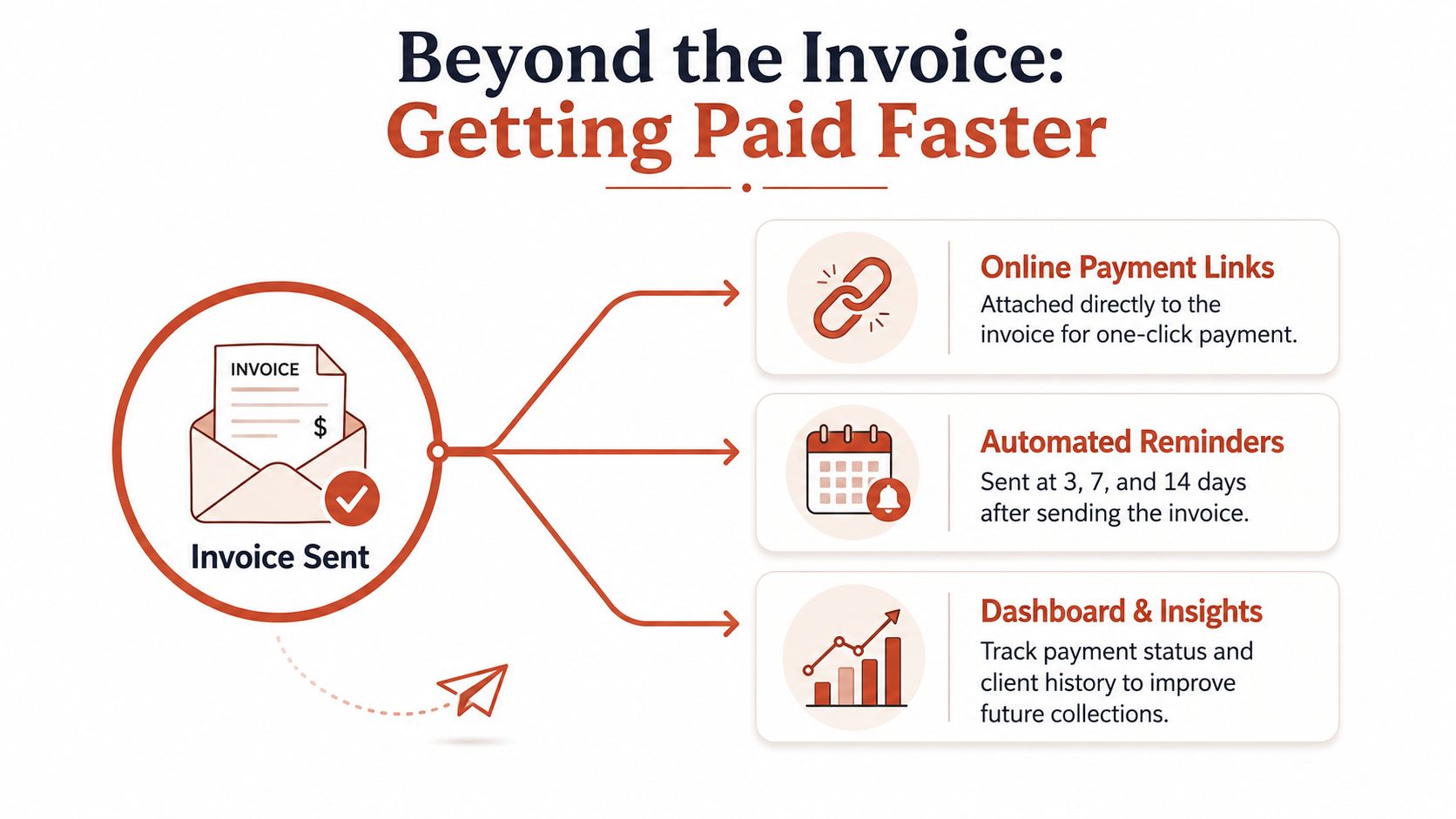
Sending an invoice is not the same as collecting money. The post-invoice workflow determines whether the client can act immediately or has to turn your request into a small administrative project.
A payment link changes the experience from a mail-order form to a checkout counter. The client opens the invoice, sees the amount, chooses an available method, and completes the transaction in the same place. Without that link, the client may need to copy bank details, ask a question, locate a portal, or forward the document to someone else.
An invoice-level analysis of more than 100,000 freelancers found that 29% of invoices were paid at least one day late. It also found that more than 75% of late invoices were paid within 14 days after the due date and 90% within one month (freelance invoicing payment analysis). The same analysis reported that cryptocurrency payments were almost three times more likely to be late than ACH or bank transfer, while invoices over $20,000 were three times more likely to be late than invoices under $100. Those patterns point toward reducing payment friction and matching clients with practical payment rails.
The collection loop
A useful workflow connects four actions:
- Online payment links: Put the payment action directly on the invoice page.
- Reminder cadence: Schedule polite follow-ups at 3, 7, and 14 days, a cadence described in the verified workflow data.
- Instant invoice pages: Give the client a browser-based page that can handle review, approval, and payment without requiring a separate email exchange.
- Reconciliation: Record the received funds against the invoice and return the status to your bookkeeping records.
These actions remove different kinds of waiting. The link removes search time. The reminder removes memory work. The invoice page reduces approval friction. Reconciliation prevents a paid invoice from remaining ambiguous in your records.
The online payment workflow deserves the same attention as the timer. Marketing often highlights capture because a stopwatch is easy to demonstrate. Cash conversion happens later, at the payment rail, so evaluate both halves with equal weight.
The Hidden Cost Most Comparisons Miss
Many buying guides make the app selection look like the central problem. For a solo operator, the larger risk often sits between the buttons: forgotten work, unclear billing rules, scope that never becomes a line item, and an invoice that asks the client to do too much.
Consider a designer who completes a rush revision but forgets to start the timer. Four billable hours disappear from the record. She remembers the work later, but by then she has to reconstruct the task, confirm the rate, decide how to describe it, and fit it into the next invoice run. After sending the invoice, she waits three weeks for it to clear because the client has no direct payment path and needs a follow-up email.
The missing hours and the delayed payment are separate failures. A reliable system needs a feature or habit for each one.
Match each risk to a control
- Forgotten timers: Use manual time entry, activity review, calendar context, or automatic capture that you can classify later.
- Silent rounding changes: Set rounding at the project or contract level and review how a short entry appears before issuing the bill.
- Scope creep: Create a project or task entry as soon as out-of-scope work begins, then review unbilled activity before closing the billing period.
- Invoice friction: Attach a payment link and keep approval, invoice viewing, and payment in one accessible workflow.
- Unclear status: Use a dashboard or client record that distinguishes draft, sent, viewed, overdue, and paid states.
The point isn't to eliminate every manual action. Some review is healthy because software can't know whether a client call was billable or whether idle activity represented real work. The point is to place review at a convenient moment, before forgotten details become expensive reconstruction.
Measure the gap: Count the days from job completion to cash in your bank account. The number of timers stopped is only a supporting measure.
A 2026 market estimate places the global time tracking market at roughly $6.1 billion in 2025 and projects $11.43 billion by 2030, reflecting interest in broader administrative workflows rather than standalone timesheets (time tracking and invoicing software coverage). For your business, that broader workflow matters only if it removes a delay you can see in your own records.
Choosing and Evaluating Your Setup
Start with the handoff, not the feature page. Open a candidate tool and ask whether a tracked entry can become a usable invoice line without manual reformatting, copying, or rebuilding the description.
Use this checklist during a real trial:
- Test the timer: Start work on a client project, stop it, edit the duration, and add a forgotten entry manually.
- Verify the ledger: Confirm that each entry retains the client, project, task, billable status, and applicable rate.
- Check rounding: Match the setting to the language in your client agreement. Test a short entry and inspect the final invoice.
- Review invoice creation: Select unbilled hours and confirm that the generated line includes a clear description, duration, rate, and amount.
- Follow the payment path: Open the invoice as a client would. Check whether payment is available without a separate email conversation.
- Inspect reminders: Verify that reminders can follow the cadence you want, including 3, 7, and 14 days when that schedule fits your process.
- Pressure-test mobile capture: Log time from the phone or browser you use in the field, not the device shown in a product demo.
- Confirm portability: Check whether you can export clients, income, expenses, or invoice records if you later change systems.
A product such as AurenWell combines a built-in timer with manual entries, lets logged hours move onto invoices, and includes online payment links and overdue reminders as part of its solo-operator workflow. It can be evaluated alongside a dedicated tracker connected to accounting software, a spreadsheet-based process, or another all-in-one platform.
Compare before and after
Record your current baseline before changing tools. Note how many days pass between completing work and issuing the invoice, then how many days pass between issuing it and receiving payment. Also ask whether invoice creation feels closer to five minutes or fifty, whether clients pay without a follow-up email, and whether unbilled hours remain at month-end.
Repeat the same review after 30 to 60 days, a comparison window specified in the operating plan, and look for direction rather than a single perfect result. The right setup is the one that shrinks your measurable cash gap while preserving accurate records and a client-friendly billing experience.
Stop treating your timer and invoice as separate chores. Choose one recent hourly project, trace every step from the final work session to the bank deposit, and identify the first avoidable delay. Then test a connected workflow against that exact project, review the resulting invoice, and measure whether the next payment arrives with fewer handoffs.