
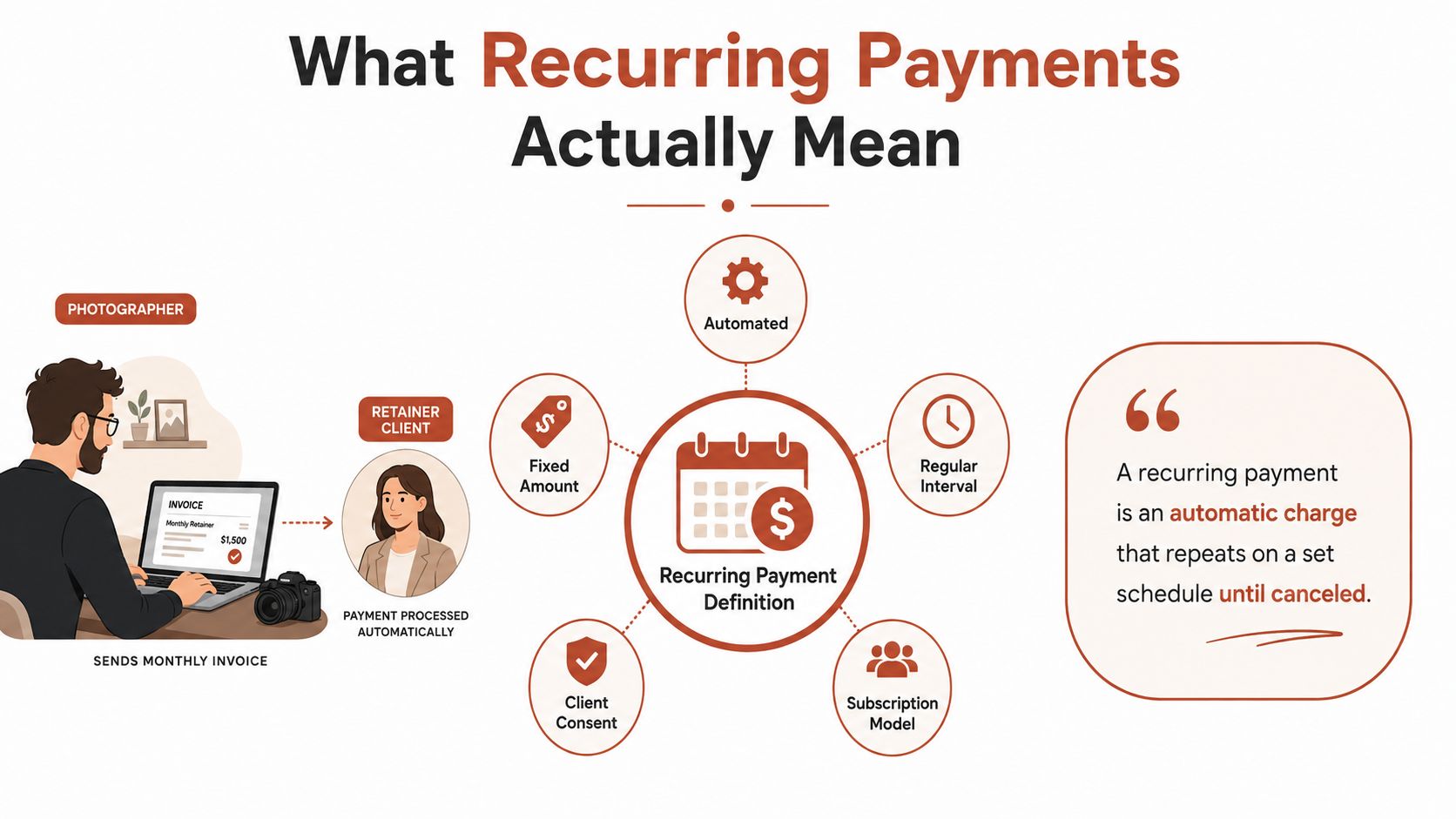
A recurring payment is an automatic charge that repeats on a set schedule until the customer cancels. A recurring billing system is the wider workflow around that charge, which is where most solo operators get tripped up.
A photographer sending the same retainer invoice every month, a coach collecting a deposit before each session block, and a lawn-care business billing repeat clients on a seasonal rhythm are all dealing with the same core idea. The customer has already agreed to be charged again, but the merchant still has to decide whether the money should move automatically, whether an invoice should be sent first, and how cancellation, retries, and reminders should work.
What Recurring Payments Actually Mean
A solo photographer who sends the same invoice to a retainer client every month isn't really doing a new sale each time. They're using a recurring payment, which is an automatic charge that repeats after the customer has agreed to it once.
In plain English, a recurring payment is money that moves on a repeating schedule, weekly, monthly, quarterly, annually, or on another agreed cadence, without the customer approving every single charge. That setup is foundational in subscription-style commerce and also in repeat service work, because it turns a manual checkout into an automatic collection flow. The core definition matches modern recurring-payment systems described in Bankful's explanation of recurring payments.
The four shapes this takes in real service businesses
For solo operators, recurring payments usually show up in four practical forms. A fixed subscription is the easiest to picture, one steady amount on a steady schedule. A usage-based plan changes with work done, a payment plan splits a larger balance into scheduled installments, and a scheduled one-off invoice repeats on a calendar but may still need the client to pay each time.
A recurring payment is about the schedule and permission, not just the label on the invoice.
That distinction matters because the same client relationship can move in different ways over time. A website maintainer might start with a fixed monthly retainer, then add a seasonal cleanup fee, then switch to a scheduled invoice when the scope becomes irregular. The payment stays “recurring” because the business and client have agreed on repeat collection, even if the amount isn't identical every time.
Recurring Payment Versus Recurring Billing
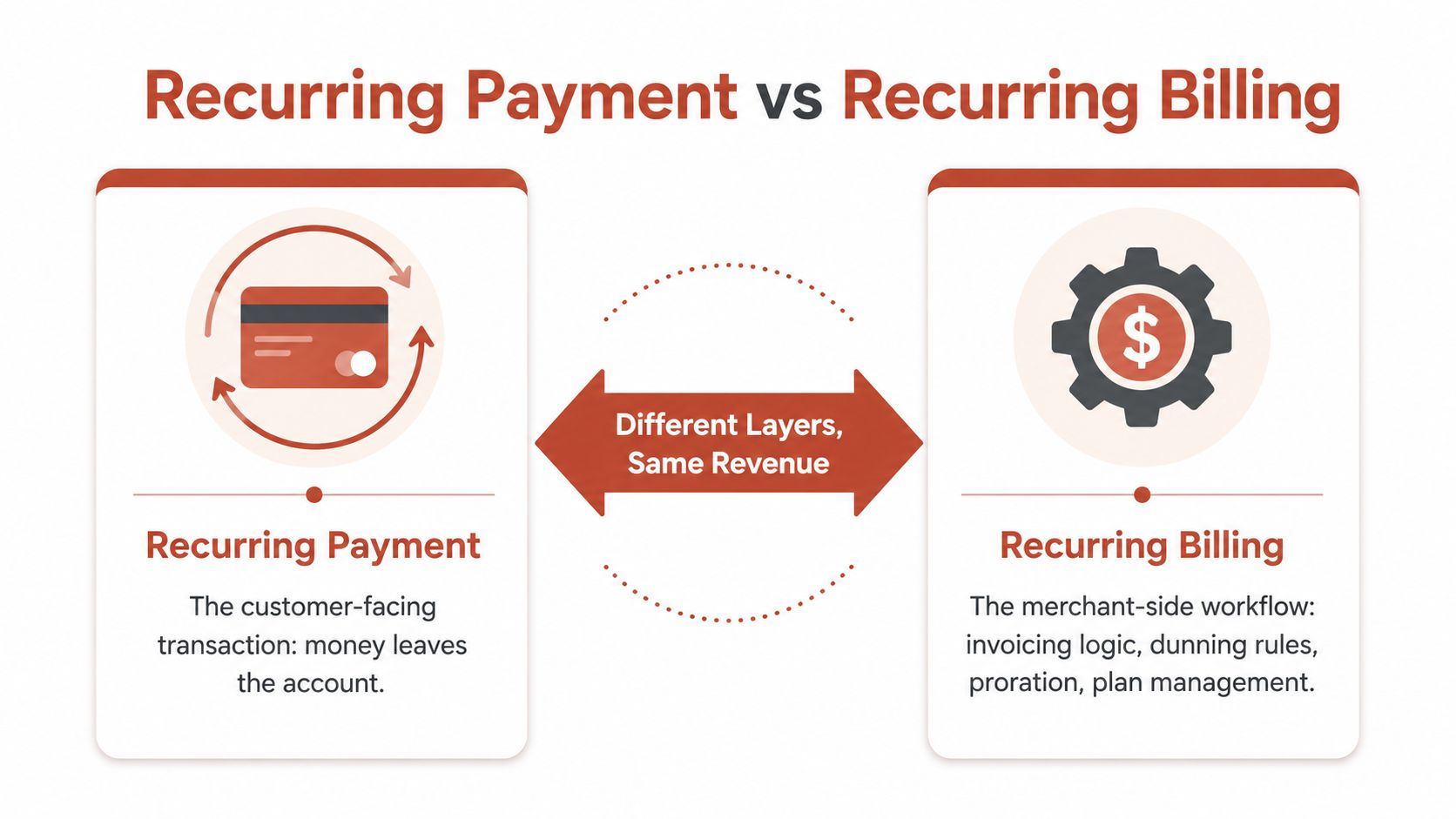
People use these phrases as if they mean the same thing, but they sit at different layers. Recurring payment is the actual money movement. Recurring billing is the merchant-side system that decides when to bill, how to notify, what to do if a charge fails, and how to handle cancellations and compliance.
A bakery analogy helps. Billing is the recipe, the calendar, and the kitchen process for preparing each request. Payment is the cash that goes across the counter when the customer's card or bank account is charged. If the billing workflow is sloppy, the payment may never happen even if the invoice looks fine on screen.
This is why merchant-initiated transactions matter. The charge itself is the payment, while the surrounding workflow includes invoicing logic, retry rules, customer notices, and consent controls, which are part of the broader billing layer. Solidgate's recurring billing overview draws that line clearly, and it also notes that stored credentials or tokenized card data usually sit underneath the recurring charge.
For a solo business, confusion usually shows up as a system that generates an invoice but never charges anything. The reverse happens too, a charge goes through, but no invoice or reminder is issued, which makes reconciliation messy later.
Practical rule: if money moves, you're looking at the payment layer. If the business decides when and how the request is created, you're looking at billing.
Subscriptions and Scheduled Invoices Compared
A lot of confusion comes from treating every recurring setup like a subscription. That view is too narrow. A subscription fits a fixed charge that repeats on its own, while a scheduled invoice fits repeat work where the timing is predictable but the amount or line items can change from cycle to cycle.
Subscriptions make sense for steady services, such as monthly coaching, hosting, or membership access. The client authorizes the charge once, then the system keeps charging the same amount on the agreed schedule. That keeps the process simple because the amount, timing, and payment method stay the same.
Scheduled invoices fit work that changes from one cycle to the next. Seasonal cleanups, retainers with shifting scope, or a monthly bill that includes a partial deposit and then a different balance later all belong here. The business can send the invoice on a fixed date, but the client still reviews and pays each one.
For that second setup, recurring invoices can keep the reminders going without assuming every charge will match the last one.
| Dimension | Subscription | Scheduled Invoice |
|---|---|---|
| Payment behavior | Auto-charged on a set schedule | Sent on a set schedule, then paid each time |
| Amount | Usually fixed | Can vary by job, scope, or add-ons |
| Best fit | Retainers, memberships, ongoing access | Repeat projects, seasonal work, irregular repeat clients |
| Client action | Usually one-time authorization | Payment may be required each cycle |
| Admin load | Lower once set up | More flexible, more review work |
Many service businesses use a mix of both. A base subscription can cover standing fees, while a scheduled invoice handles extras. That keeps repeat work organized without forcing irregular jobs into a rigid subscription shape.
How Recurring Payments Work Step by Step
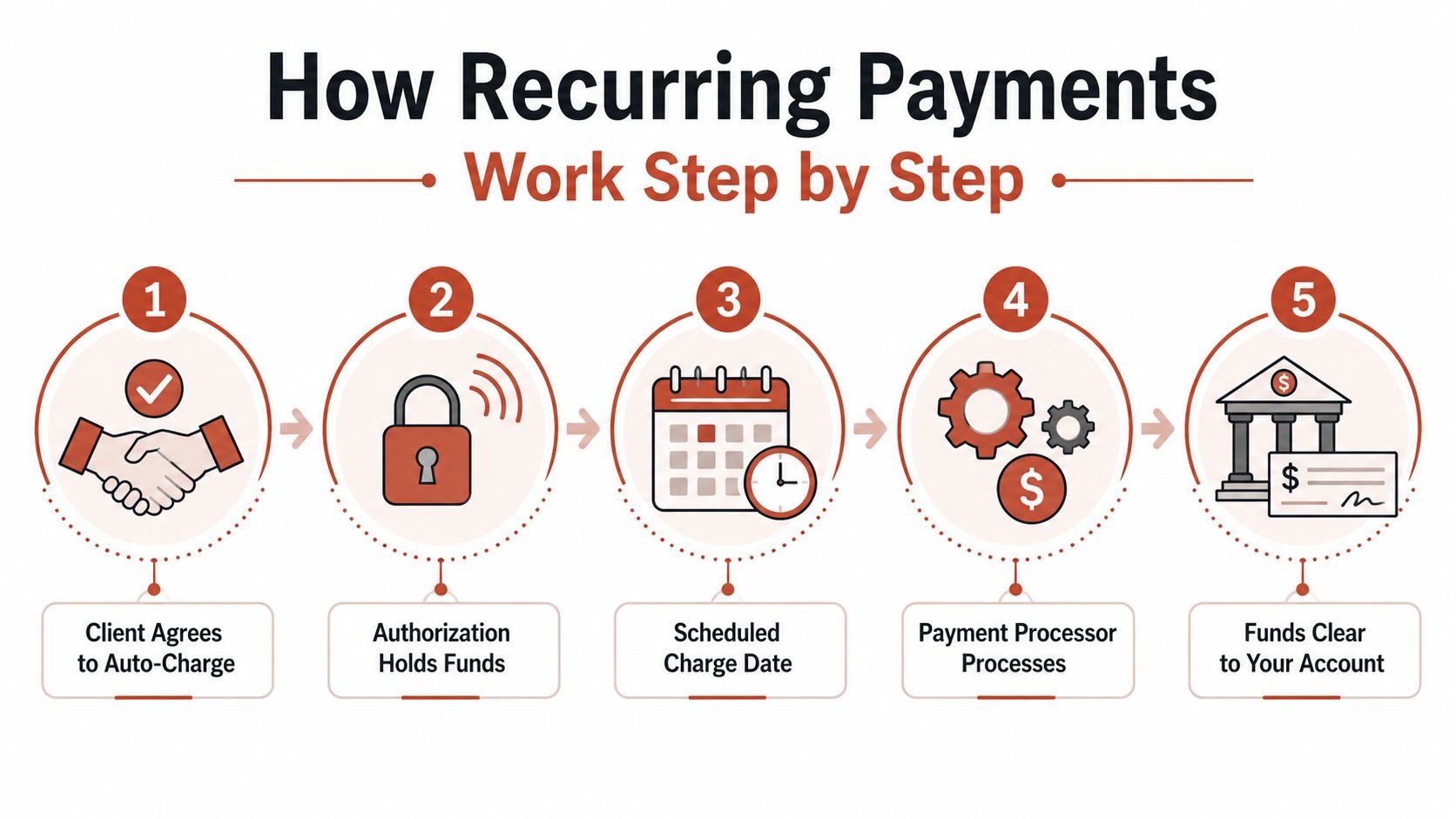
The first step is simple, but it matters most. The client agrees to be charged automatically on a set schedule, and that agreement becomes the basis for future charges. Without that consent, the whole workflow falls apart.
After that, the business stores the payment method in a secure way, usually through stored payment credentials or a token that represents the card or bank details. Tokenization reduces exposure of sensitive data because the merchant doesn't keep using the raw account number every time. For solo operators using bank transfers or cards on file, that's what keeps repeat billing from turning into a manual copy-and-paste exercise.
What happens after approval
The schedule can be weekly, monthly, quarterly, annually, or custom. On the charge date, the processor attempts the payment, and the funds either clear or fail. If the payment fails, retry logic and updated card details can help avoid lost revenue, which is why tools with card updater services matter when cards expire or get reissued.
Online payments matter here because the checkout flow has to capture both consent and a usable payment method without creating friction for the client.
A freelancer billing a retainer client might think of this like a coffee shop keeping a tab. The client doesn't re-order the same drink from scratch every time. The shop already knows the agreed pattern, then collects payment when the day's run is complete.
The smoother the setup, the less your business feels like it's “chasing invoices” and the more it feels like it's running on a calendar.
Why Recurring Payments Matter for Your Business
A solo operator feels the difference quickly. Recurring payments mean fewer reminder emails, fewer late follow-ups, and less time checking whether the same client has paid again. Payment stops being a task you have to remember and becomes part of the business routine.
The main benefit is predictability. When a retainer, installment, or repeat service is collected on a schedule, you can see money coming in more clearly and plan purchases, tax set-asides, and vendor payments with less guesswork. The amount may change from one client to another, but the pattern is easier to manage.
There is also less mental clutter. Manually tracking who owes what, which client needs a reminder, and which payment is overdue pulls attention away from the work you sell. Recurring collection reduces that friction by handling the routine billing steps for you.
What you stop doing by hand
- Chasing every due date: You do not have to draft the same follow-up message each month.
- Rebuilding the same invoice: You do not have to recreate a repeat bill from scratch for every cycle.
- Wondering who paid: You have a cleaner record of scheduled collection and payment status.
Businesses using AurenWell's recurring invoices feature use that kind of rhythm to keep repeat billing tied to the work, not to memory.
The cost of manual billing shows up in small interruptions. Unpaid invoices linger, missed installments pile up, and every exception forces you to stop billable work to sort through paperwork. For a one-person business, that interruption often costs more than the payment tool itself.
Key Terms You Should Know
A few words keep showing up in billing software, and they're easier to understand once they're translated into plain English.
ACH is a bank-to-bank transfer network in the U.S. For recurring billing, it's often used when a client wants payments pulled from a checking account instead of a card.
Card updater is a service that refreshes expired or replaced card details. If a client gets a new card, the updater helps the recurring charge keep working.
Dunning means the follow-up process for failed payments. That can include reminders, retries, and messages asking the client to update their payment method.
Failed payment is exactly what it sounds like, a charge that didn't go through. A common example is an expired card or an account with insufficient funds.
Mandate is the client's authorization to be charged on a repeating basis. In plain terms, it's the permission slip that makes the automatic charge legitimate.
MICR stands for magnetic ink character recognition, the numbers printed at the bottom of some checks. You'll mostly notice it when recording or processing check-based payment details.
Payment gateway is the front door for collecting payment details and sending them safely into the payment flow. It's what connects the checkout page to the rest of the system.
Payment processor is the company that moves the transaction through the network and handles the authorization response.
PCI compliance means following the security rules for handling card data. If you never want to store raw card numbers yourself, this still matters because the software around you has to be built for it.
Proration is a partial charge or credit when a plan starts, ends, or changes in the middle of a cycle. A client who upgrades halfway through a period might owe a prorated difference.
Retry logic is the rule set that decides when to try a failed charge again. Good retry logic reduces the chance that one temporary issue becomes a lost client payment.
SCA means strong customer authentication. It's a security check used in some regions to confirm the customer is really the one approving the charge.
Tokenization replaces sensitive payment details with a secure token. That way, the business can charge the right account again without storing the raw number.
Trial period is a free or low-cost starting window before the regular recurring charge begins. It gives the client time to test the service before the full billing cycle starts.
Variable recurring payment is a repeating charge where the amount changes from cycle to cycle. That's useful when usage or project scope changes.
Webhook is an automatic message from one system to another when something happens, like a payment succeeds or fails. It helps your invoicing software update records without manual checking.
Common Misconceptions and Compliance Basics
A lot of people hear “recurring payment” and assume it means “fixed monthly card charge.” That's too narrow. Recurring arrangements can also involve bank debits, changing amounts, and repeat schedules that aren't tied to a subscription at all. Stripe's recurring payment guidance notes that recurring payments can run weekly, monthly, annually, or on a custom schedule, and it also points out that the term covers more than simple subscription charges.
Bank rails and card rails also follow different rule sets. A card charge, an ACH debit, and a direct bank setup don't behave the same way when a client disputes a charge or cancels authorization. That's why “auto-pay” doesn't mean “unstoppable.”
Basic rule differences to keep in mind
| Payment Method | Authorization | Dispute Window | Cancellation |
|---|---|---|---|
| Card on file | Customer agrees up front | Handled through card-network and merchant rules | Customer or merchant can end the arrangement |
| ACH or bank debit | Bank-account authorization is required | Often treated differently from card disputes | Usually needs clear revocation steps |
| Variable recurring payment | Amount can change within the agreed setup | Depends on the rail and local rules | Must still be cancelable under the agreement |
In the U.S., recurring billing can trigger express consent and clear cancellation expectations under ROSCA, and preauthorized bank debits may also fall under Regulation E rules. In the U.K. and EU, Strong Customer Authentication and PSD2 shape how approvals are handled. Those rules are part of why a clean cancellation path and good notice flow matter so much.
If you handle payment data directly, AurenWell's security and data page is worth reviewing alongside your processor's own controls.
A recurring setup should be easy to start and just as easy to stop.
Choosing the Right Setup for Your Business
The right setup usually comes down to three questions. How often do repeat clients get billed, do the amounts stay fixed, and which payment method do they use? If the answer is steady cadence, steady amount, and card or bank authorization up front, a subscription-style setup is usually the cleanest fit.
If the answer is repeat work, changing scope, and amounts that move from cycle to cycle, scheduled invoices make more sense. They preserve the repeat rhythm without forcing your pricing into a fixed box. That's often the better choice for consultants, home-service providers, and creatives whose work changes month to month.
A hybrid can work when part of the relationship is stable and part of it isn't. A base recurring charge can cover standing fees, then a separate invoice handles extras, deposits, or add-ons.
Before you choose software, check for three things. It should support the payment rail your clients use, it should handle retries and customer records cleanly, and it should make consent and cancellation easy to document. If the tool makes those steps confusing, the billing setup will be confusing too.
Recurring payments are less about adding a fancy feature and more about matching the payment rhythm to the way your business delivers work. When the schedule, amount, and method line up with real client behavior, billing gets simpler and payment follow-up gets lighter.
If your billing is still a mix of memory, spreadsheets, and last-minute reminders, pick one repeat client and map their next three payment cycles on paper. Then move that pattern into your invoicing or payment tool, test the reminders, and make the cancellation path obvious before the next invoice goes out.