
The system's running again. You've packed the gauges, explained the repair, and put the old part in the truck. Your customer asks you to send the bill, and you say you'll email it tonight. Now the work is finished, but getting paid is another job waiting for you at home.
The Moment You Finish a Job and Realize You Still Have to Bill
Back in the cab, you've got a handwritten note, a parts receipt, and a text message approving the repair. None of them is an invoice. You can type everything into Word later, assuming you remember the extra labor and can find the receipt.
That's the part of running solo that software should fix. Not managing an imaginary office staff. Not building a sales pipeline when you've already got tomorrow's calls booked.
The office work follows you home
For a one-person HVAC business, billing competes with ordering parts, returning calls, and getting some rest. In the January 2025 HVAC Industry Pulse survey of 1,316 HVAC/R professionals, owners of companies with 1–10 employees reported averaging 15.4 hours of administration weekly, with quotes and invoices among the most time-consuming tasks. That group isn't exclusively solo operators, but the workload is relevant.
Paper can record what happened. The trouble starts when you have to assemble several pieces of paper into something the customer can approve, understand, and pay.
Practical rule: The service call isn't administratively finished until the customer has the bill and you can see what happens next.
Buy for the business you actually run
My recommendation is to treat HVAC invoicing software as its own buying decision. You don't automatically need dispatch, payroll, inventory management, and a customer relationship management system just because you repair heating and cooling equipment.
Start with the unfinished task in the truck. If a narrow tool handles that task cleanly, a larger platform must justify its extra cost and setup. More capability is useful only when you will use it.
What HVAC Invoicing Software Actually Is
HVAC invoicing software connects the work you've recorded with the money the customer owes. It should turn job details into a readable bill, give the customer a way to pay, and preserve the supporting records.
That places it between a spreadsheet you maintain yourself and a full field-service management platform.
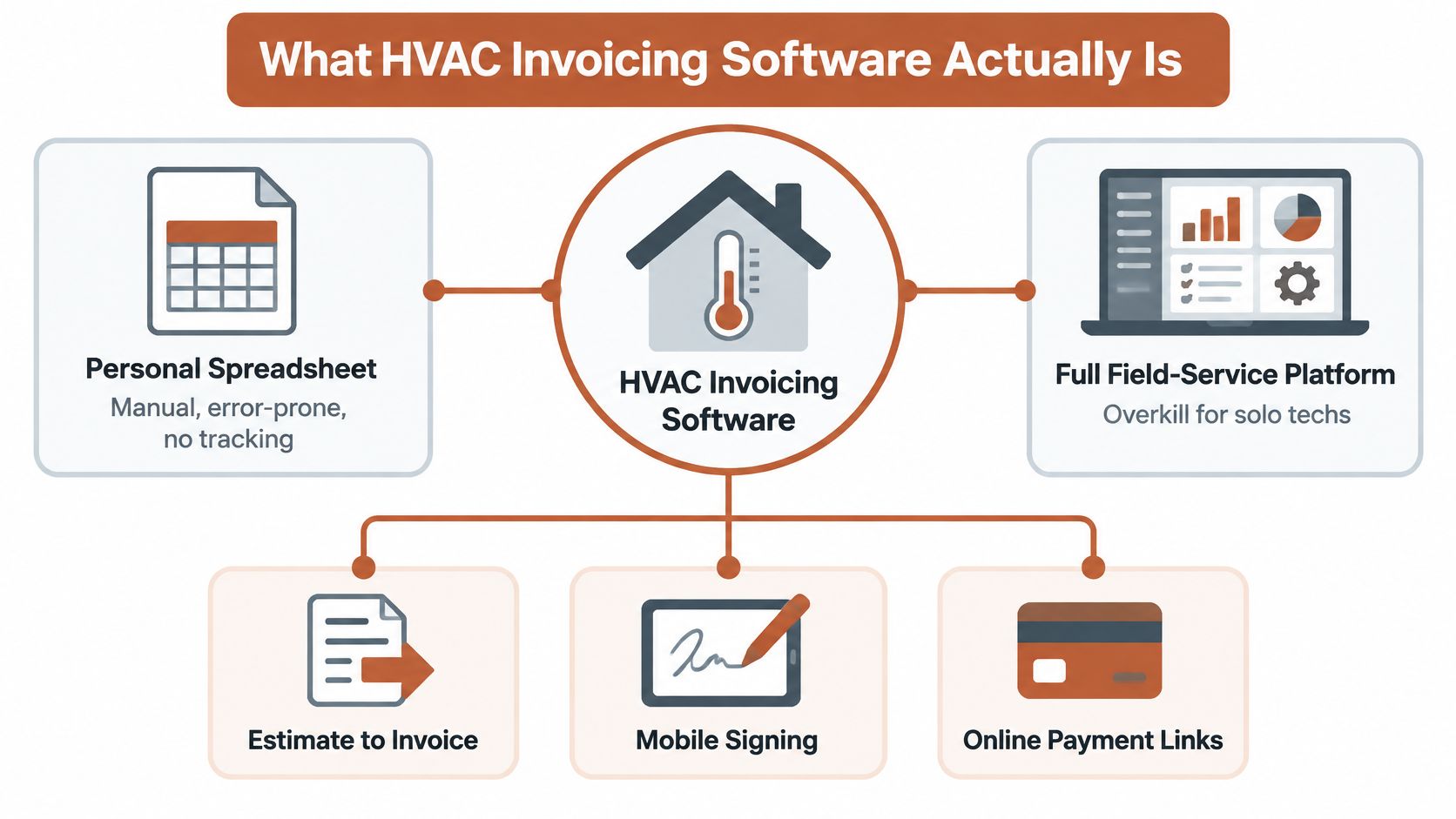
Where the boundaries belong
A spreadsheet can be perfectly adequate for calculating a bill. But unless you build and maintain other processes around it, you're still responsible for sending documents, matching payments, and filing approvals.
An accounting application answers a different question: what happened financially across the business? Your invoicing tool should help you collect the money. Your bookkeeping process still needs to reconcile transactions, classify expenses, and support tax preparation.
A full field-service platform has a wider operational scope. That can make sense when you need to assign technicians, coordinate schedules, or manage stock across vehicles. It isn't automatically the right starting point for someone working alone.
The essential jobs
- Produce a clear invoice. Customers should recognize the equipment, work performed, charges, taxes, and balance without calling for a translation.
- Support collection. Sending a document shouldn't leave you guessing whether the customer received it or how they're supposed to pay.
- Preserve the history. Keep the authorization, final invoice, payment record, and relevant timestamps accessible together.
That final point matters during a disagreement. A paid status doesn't explain who authorized additional work, and a signature doesn't prove that a payment settled.
Digital records support your evidence; they don't guarantee compliance or win disputes automatically. Local invoice requirements, retention rules, and contract obligations still apply. Choose software that lets you retain the necessary information rather than assuming a polished PDF takes care of everything.
The right category is therefore smaller than a complete business-management system, but more useful than a document template alone.
How the Money Actually Moves From Job to Paid Invoice
Start recording the billable details while the job is fresh. Enter the service date, equipment identifier, work description, labor, and parts before driving away. If you use flat-rate pricing, the customer-facing charge can stay flat-rate while your internal record captures the time spent.
An HVAC mobile-workflow technology provider estimates that paper documentation and work-order handling consume approximately 2.1 hours per technician daily, exceeding 500 hours annually. That's a provider estimate, not an independent benchmark. The practical issue is the repeated handling: writing details onsite, transporting them home, and typing them again.
Keep authorization attached to the work
Use the approved estimate as the starting point, then check it against what happened. Don't add extra work to an old approval. Record the changed scope and obtain authorization before treating it as agreed.
A signature is useful, but context matters. If the customer approves verbally, record who approved, when, and what they authorized, while checking whether your contract or applicable rules require written acceptance.
Solo HVAC Invoice Workflow and the Feature That Supports Each Step
| Workflow Step | What You Need From the Software |
|---|---|
| Finish the service call | Mobile job notes with equipment and service details |
| Capture labor and materials | Time entries and editable parts lines |
| Confirm the agreed scope | Stored estimate approval and documented changes |
| Prepare the final bill | Estimate conversion with a review before sending |
| Apply a deposit | A visible credit against the remaining balance |
| Request payment | A customer-facing checkout or payment instructions |
| Record the outcome | Separate handling for pending, received, and settled payments |
| Close the record | Receipt, document history, and exportable files |
Don't confuse a payment attempt with payment
Send the invoice through the customer's agreed channel and confirm the address. For the document fields themselves, use an HVAC invoice template as a setup checklist rather than rebuilding the layout on every call.
Card and ACH transactions need their actual processing status recorded. Cash needs an acknowledgment, while a check in your hand shouldn't be confused with cleared funds.
For weak connectivity, test the exact behavior before depending on it. Can you save a draft, recover unsent changes, and tell whether delivery succeeded? Browser access alone isn't evidence of offline capability. If the tool requires a signal, keep a fallback for capturing job details and reconcile it promptly.
Features That Matter and Features to Skip on Purpose
A useful demo should start with a service call, not a dashboard tour. Ask the vendor to show a repair estimate becoming an approved invoice, then follow the payment through to the customer record.
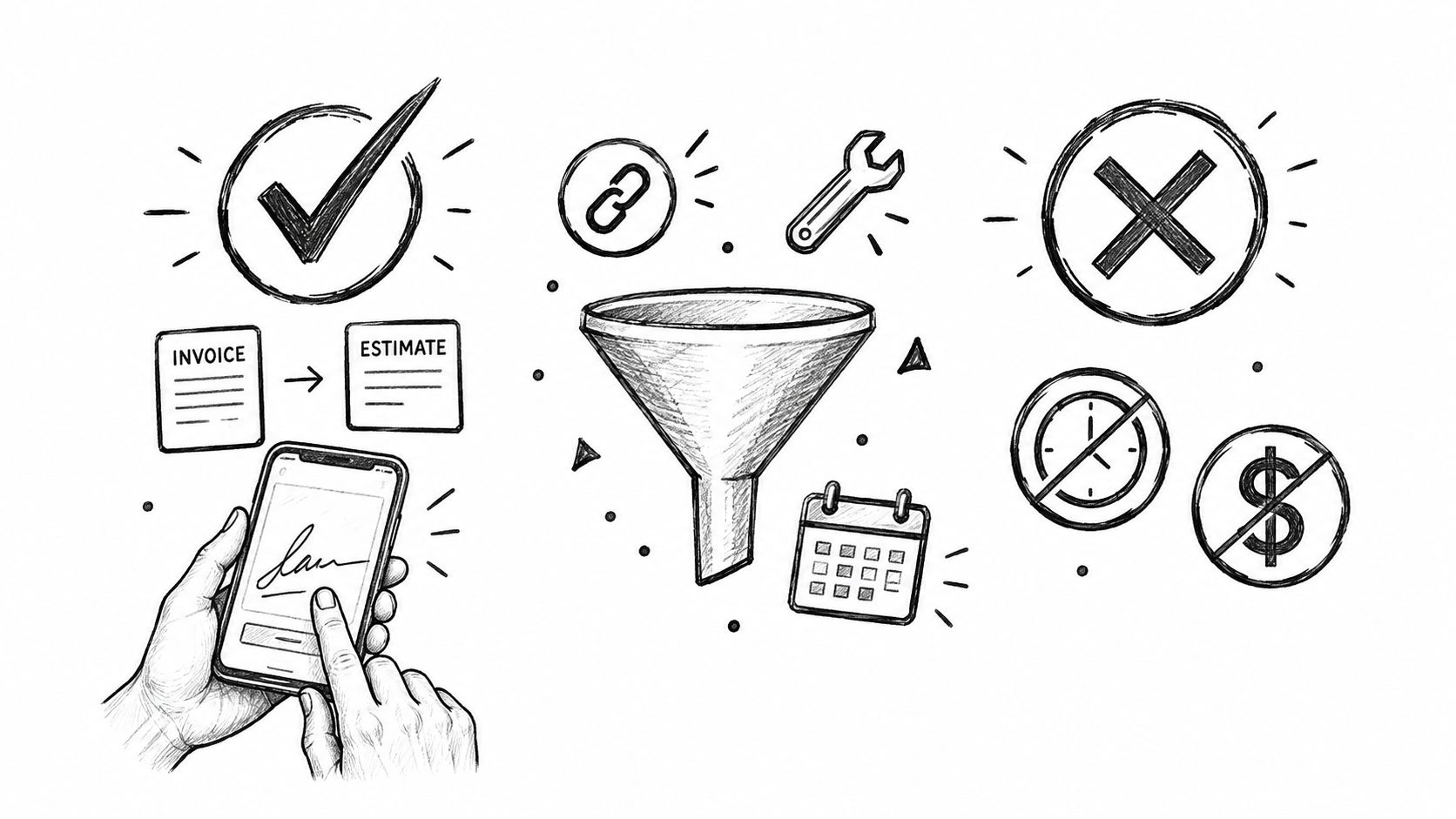
Use this illustration as a reminder of the connected tasks, not a reason to buy every surrounding module.
Insist on the billing essentials
- Estimate-to-invoice conversion. Agreed descriptions and prices should carry forward, with an opportunity to review the final bill.
- Mobile signing. Test the customer's experience on a phone, including whether approval requires an account or app.
- Online payment links. Inspect the checkout, supported payment methods, and receipt. The online payments feature overview provides an example of this billing layer.
- Controlled reminders. You need to pause them during a dispute and stop them when a manual payment is recorded.
- Activity logs. Distinguish a document being sent or viewed from the customer approving it.
- Clean PDF export. Open an exported document outside the system. Check that the information you need remains readable.
AurenWell is one narrow option: its published scope includes estimates, invoices, mobile signatures, payment collection, and document exports. Compare that approach with a general accounting application or a full field-service suite using the same repair scenario, rather than comparing feature counts.
Leave unrelated work out of the purchase
| Feature to Skip Initially | Why a Solo Operator Might Not Need It |
|---|---|
| Dispatch boards | You aren't assigning calls among technicians |
| Full inventory modules | Maintaining stock movements may exceed your actual tracking needs |
| Payroll | It doesn't solve billing when you have no employees |
| Multi-location reporting | It adds little when you operate from a single base |
| Elaborate CRM pipelines | A straightforward client history may cover your follow-up needs |
There are legitimate exceptions. If you carry valuable stock and regularly lose track of it, inventory control may deserve its own decision. The point isn't to reject useful software. It's to stop unrelated features from determining which invoicing tool you buy.
A One-Week Adoption and Migration Checklist
Treat the first week as a controlled trial, not a promise to migrate your entire business history. Keep the existing records intact until you've proved that the new system can handle a job and return your documents.
Use the checklist visually, then work through the actual files.
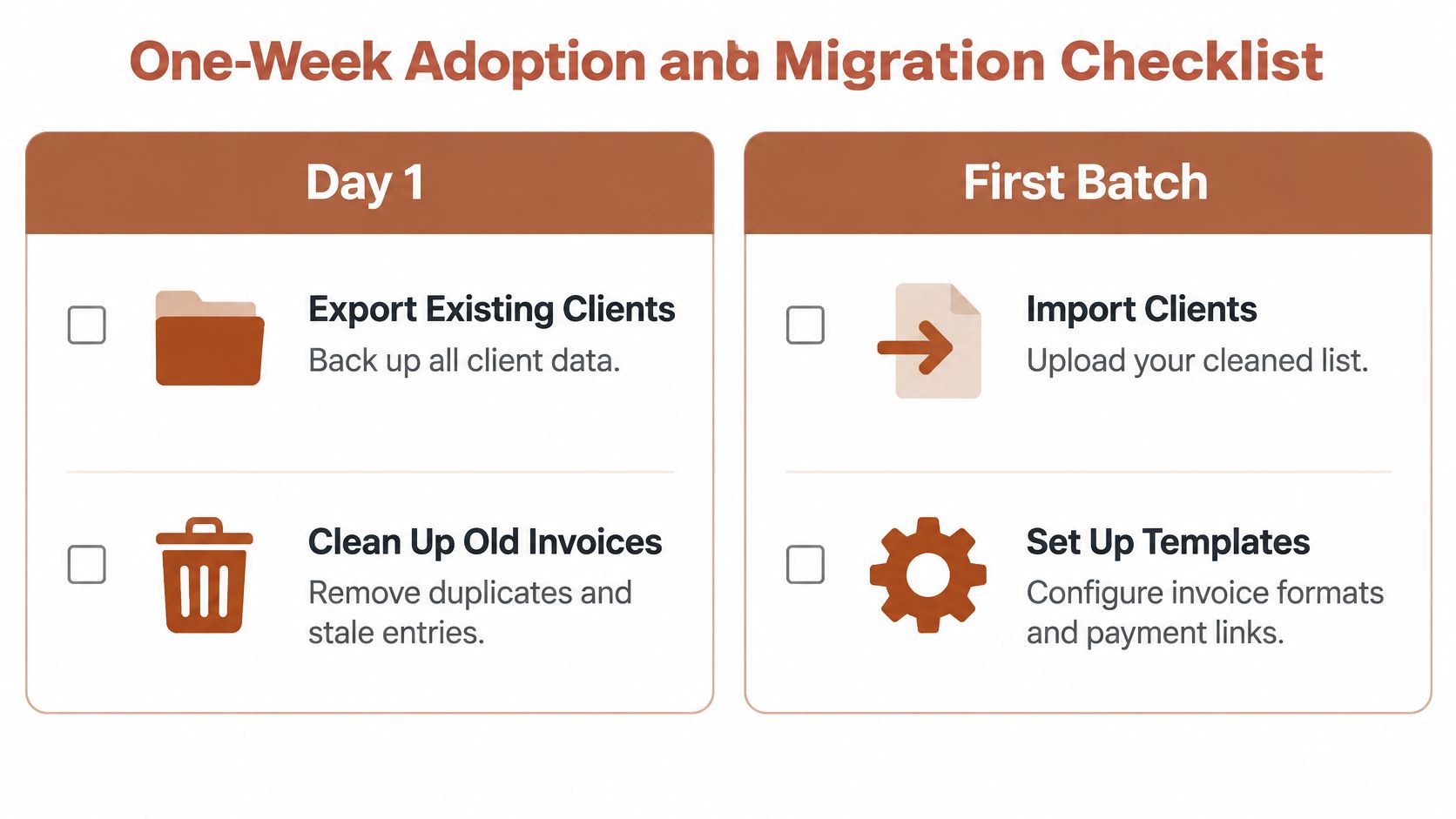
Prepare and test
- Day one, back up first. Export clients, invoices, and outstanding balances. Remove duplicates from your working import file, not from the original archive.
- First batch, import selectively. Bring across active customers and open work. Mark imported balances carefully so you don't bill the customer twice.
- Configure the defaults. Check business details, currency, dates, tax treatment, payment instructions, and invoice numbering. Get qualified advice where tax settings are unclear.
- Run a real job. Create the estimate, capture approval, issue the invoice, and process the chosen payment method. Test reminders on a controlled record rather than sending unnecessary notices to a customer.
The reason to finish the trial is practical: a 2025 small-business late-payment report cited in industry coverage found that 56% of U.S. small businesses had unpaid invoices, with affected firms owed an average of USD 17,500; the coverage also cites an average payment wait of about 29 days. These are directional small-business figures, not an HVAC-specific payment benchmark.
Prove you can leave
Export a completed invoice, signed approval, client list, and transaction data. Check whether attachments and audit history require separate downloads. A CSV of totals isn't a complete document archive.
Use the video alongside your hands-on trial, not instead of testing your own records.
Only retire the old billing process after reconciling open balances and confirming continued access to historical documents. Don't cancel an account that still holds the only copy of a customer's approval.
Pricing Models and What Each One Really Costs Per Invoice
Compare total cost per paid invoice, not just the subscription price. Include software charges, required add-ons, payment costs, and any fees associated with exports or manual payment recording.
The supplied comparison graphic uses illustrative prices, not verified current vendor quotes. Use its method, then replace the figures with written terms from the tools you're considering.
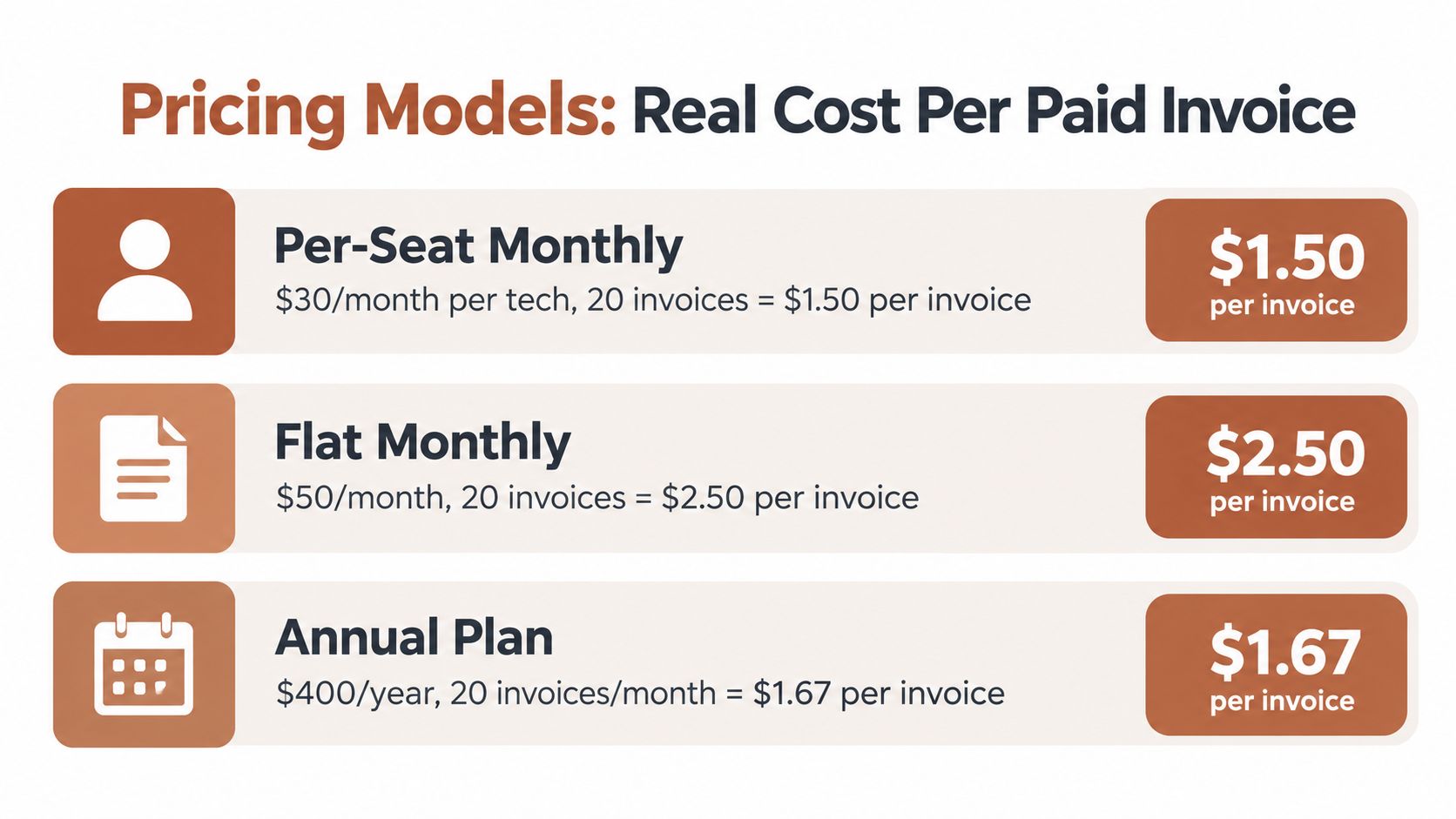
Compare equivalent periods
| Pricing Model | Calculation to Use | Trade-off to Check |
|---|---|---|
| Per-seat monthly | Required seat charges divided by paid invoices | Minimum seats and paid access for outside help |
| Flat monthly | Subscription and required extras divided by paid invoices | Document limits and restricted features |
| Annual | Annual subscription divided by annual paid invoices | Upfront commitment and cancellation terms |
| Lifetime | Purchase cost spread across your expected usage | Included features, support, and service continuity |
For a worked comparison without made-up vendor prices, take a monthly quote and add its required extras. Divide that total by the invoices you collected during a representative month. Then calculate the annual offer against your paid invoices across the year, including quiet periods.
A lifetime option needs more judgment. It changes the subscription payment schedule; it doesn't remove processing charges or guarantee that the service will remain suitable indefinitely. Review the current pricing and plan terms rather than relying on a remembered offer.
Separate processing from software
Ask for card and ACH charges in writing, including percentage charges, fixed charges, platform markups, and any applicable return or dispute costs. Check payout timing too. A customer's completed checkout and money available in your bank aren't necessarily the same event.
A lower subscription can still cost more if the platform adds charges to the payment methods your customers actually use.
Manual payments deserve the same scrutiny. Find out whether recording cash, checks, or bank transfers costs anything and whether those entries stop reminders correctly.
Finally, judge the return against your own records. Track administrative time, collection delays, and total fees before and after switching. Faster collection improves cash availability, but collecting an existing receivable sooner isn't additional revenue. Don't count it as profit when deciding whether the tool pays for itself.
Why a Narrow Tool Usually Beats a Full Field Service Suite
For a solo operator, the strongest argument for a narrow tool is the amount of unrelated setup you can avoid. You need to finish a service call and bill accurately. You shouldn't have to configure territories, employee permissions, and sales stages first.
That is a buying recommendation, not a claim that smaller software always performs better. A full suite can be the right choice when you need coordinated scheduling, inventory control, or integrated operations.
Learnability is part of the cost
Research examining e-invoicing adoption among 12 Finnish small and medium-sized businesses focused on usability, learnability, and perceived administrative benefit. It wasn't an HVAC software comparison, so it doesn't prove a particular product wins. It does support treating ease of learning as a serious selection criterion.
The practical inference is straightforward: every workflow you must learn needs to earn its place. If you only open the program to bill customers, unrelated modules can become setup and training work rather than useful capability.
Buy the workflow you'll use after a tiring call, not the dashboard that looks impressive during a sales presentation.
Make the vendor demonstrate the answer
- Can I complete this from my phone? Walk away if the essential billing steps require a desktop workaround you can't reasonably perform onsite.
- What must the customer install or create? Treat mandatory registration as a trade-off to test, not a detail to discover after purchase.
- What happens when something goes wrong? Ask about failed payments, duplicate sends, lost connectivity, refunds, and disputed work.
- Can I retrieve the complete record? A vague promise that your data is yours isn't enough. Ask for an actual export.
A suite deserves consideration when it solves an operational problem you already have. Buying one merely because you might hire someday means paying for that future while doing the setup now.
Choose the smallest system that completes the present job reliably. Revisit the decision when your business changes, using exported records rather than dependence on a vendor as your continuity plan.
The One-Page Decision Card to Keep in the Truck
Choose HVAC invoicing software around the completed service call, not the longest feature list. Keep this card beside your trial notes so a polished demonstration doesn't replace a practical test.
Keep and skip
- Must-haves: Estimate conversion, mobile approval, payment links, and an exportable document history.
- Skip unless needed: Dispatch boards, payroll, multi-location reporting, and elaborate CRM pipelines.
- Pricing checks: Total subscription commitment, processing charges, platform add-ons, and manual-payment fees.
- Questions before signup: Can you finish onsite? Can the customer act without unnecessary setup? What happens with poor connectivity? Can you export the complete record?
Keep billing and bookkeeping distinct
Don't force your invoice tool to do every financial job. If you also need help choosing the bookkeeping side, Blue Sage Tax & Accounting Inc.’s resource to compare accounting software for 1099 workers is a separate comparison to make alongside this decision.
During the trial, write down where you hesitate, what you retype, and which steps require a workaround. Those observations tell you more about day-to-day fit than a list of features you won't open.
Pick a pair of tools and run a real job through each, keeping only the chosen system's invoice customer-facing so you don't double-bill. Test approval, payment recording, and export, then keep the one that completes the work reliably with fewer taps.