
If you're still digging through last month's spreadsheet to rebuild today's quote, you already know the problem. It isn't writing the estimate. It's keeping the estimate, the approval, and the final bill aligned after the job changes, the client forgets the file name, or the tax line gets edited at the wrong moment.
A solid estimate invoice template fixes that handoff. Microsoft's template guidance shows how estimates and invoices are now created in Word or Excel and sent electronically as PDFs or printed, while template libraries across Adobe, Canva, and other providers have pushed the format into a standard digital workflow for small businesses and service providers Microsoft estimate and invoice template guidance. The useful part isn't the download itself, it's turning a generic file into a pre-billing document that can survive real client work.
A Day in the Life of a Solo Operator Chasing Estimates and Invoices
Monday starts with two estimates squeezed in between jobs. You copy line items from last month, tweak a material price, and hope you didn't miss a tax field hidden three rows down in the spreadsheet.
Tuesday, a client asks for the “quote with the breakdown” from three weeks ago. You search email, then Google Drive, then an old desktop folder because the file name changed when you duplicated it the first time. By the time you find it, the client has already moved on to another question.
Wednesday brings a verbal yes before the estimate ever went out. That sounds convenient until you realize there's no written approval to anchor the scope. The job starts, the client adds one more thing, and now the whole file needs a quick repair before anyone can invoice.
Thursday is where the billing problem shows up. The invoice goes out late, the tax line is wrong, and the client wants the math explained before they pay. Stripe's invoice guidance is blunt about the need for clear headers, unique numbering, itemized descriptions, subtotal, tax, discount math, and visible payment terms, because ambiguity slows payment and creates room for dispute invoice requirements.
Friday, the deck job changes again. You don't need more effort, you need a better structure. A reusable estimate invoice template keeps the quote, the approval, and the final bill inside one controlled flow instead of scattering them across half a dozen files.
What an Estimate Invoice Template Actually Is and Why It Matters
An estimate invoice template is a hybrid pre-billing document. It starts as a quoted scope with itemized pricing, then becomes the bill once the work is complete, so the same structure can carry the project from approval to payment.
Estimate, invoice, and contract are not the same thing
An estimate is the proposed price and scope before the work starts. InvoiceOnline's estimate guidance says a service-business estimate should include a clear label, a unique sequential estimate number, an issue date, itemized labor and material lines, a validity window, and approval capture so the client can formally authorize the work before it begins estimate template guidance.
An invoice is the payment request after work is delivered. Stripe's invoice requirements emphasize unique numbering, explicit subtotal, tax, and discount math, plus visible payment terms and methods so the record is clear when money is due invoice requirements. A contract goes further, because it creates a legally enforceable obligation instead of just a pricing document.
Practical rule: if the document is meant to win approval, keep it as an estimate. If it's meant to collect money for completed work, make it an invoice. If it's meant to bind both sides to performance, that's a contract.
The reason this matters for a solo operator is simple. A consistent template cuts drafting time, sequential numbering helps protect against scope confusion, and a signature or accept field turns a verbal “yes” into written pre-authorization. That's where the document starts doing real work for you, not just looking professional in a PDF.
Core Components Every Estimate Invoice Template Must Include
A defensible template needs more than a logo and a total. It needs fields that make the document traceable, enforceable, and easy to convert later without a rewrite.
The fields that earn their place
| Template Section | Required Fields | What It Prevents |
|---|---|---|
| Header | Business name, address, phone, email, logo | A document that looks informal or easy to ignore |
| Title and numbering | Estimate or final invoice label, sequential number | Confusing the estimate with the invoice or losing the record |
| Dates | Issue date, valid-until date, acceptance date | Endless quote drift and expired pricing arguments |
| Customer block | Customer name, billing address, job site address, contact | Sending the right bill to the wrong place |
| Line items | Description, quantity, unit, unit price, line total, taxable flag | Vague pricing and hidden assumptions |
| Totals | Subtotal, discount, tax, deposit applied, balance due | Incorrect math or buried credits |
| Payment terms | Net days, accepted methods, late-fee policy | Delayed payment and awkward follow-up |
| Approval area | Signature, printed name, date, accept checkbox | “We never agreed to that” disputes |
| Notes and exclusions | Site conditions, permits, out-of-scope items | Scope creep and surprise add-ons |
| Internal reference | Job number, project ID, CRM link | Losing the connection between documents and the job |
The header and title tell the client what they're looking at. The numbering and dates make the file auditable. The approval area matters because a simple written acceptance is easier to act on later than a message thread buried in email.
A template without exclusions is just a polite invitation to argue later.
The strongest documents also keep notes short and specific. “Includes cleanup and haul-away” is better than “miscellaneous labor.” That kind of language prevents the kind of fuzzy billing conversation that eats an evening and still doesn't settle the invoice.
Choosing the Right Format for Your Template
The best format depends on how you work, not on what looks nicest in a folder. A clean estimate invoice template in Word can be a smart choice for a quick, narrative-style quote, while Excel or Google Sheets make more sense when the job has several line items, formulas, and tax calculations.
Word and Google Docs for lighter estimates
Word and Google Docs fit jobs that read like short proposals. If you're a handyman quoting three tasks, or a tutor listing a session package, a document format can be easier to scan and faster to send. Microsoft's guidance confirms estimates and invoices can be created in Word or Excel and then shared electronically as PDFs or printed copies Microsoft estimate and invoice template guidance.
Excel and Google Sheets for calculation-heavy work
Spreadsheets are better when arithmetic matters. Excel-based templates often include automatic totals, taxes, discounts, and hour-by-rate calculations, which reduces manual math before approval and again at invoicing time Microsoft estimate and invoice template guidance. Google Sheets gives you the same structural advantage with live collaboration if you're iterating with a client or subcontractor.
PDF still matters as the locked send format. It preserves layout, keeps accidental edits out, and gives the client a clean final file. That said, don't build your working file as a PDF unless you enjoy retyping the same estimate every time the job changes.
| Format | Best For | Strengths | Limitations |
|---|---|---|---|
| Word | Short proposals and simple service quotes | Easy to read, easy to brand, familiar | Weak for formulas |
| Excel | Complex pricing and detailed calculations | Totals, taxes, and discounts calculate automatically | Can feel rigid for narrative scopes |
| Google Docs | Collaborative text-first estimates | Easy sharing and editing | Less robust for math |
| Google Sheets | Live collaboration and formula-driven pricing | Good for multi-line estimates | Formatting can be less polished |
| Final send and client-facing copy | Locks layout, easy to archive | Not good for editing |
File naming matters too. Use a stable pattern, keep the master copy untouched, and duplicate per client so older versions don't resurface when someone asks for “the latest estimate.”
Where to Download Free and Paid Estimate Invoice Templates
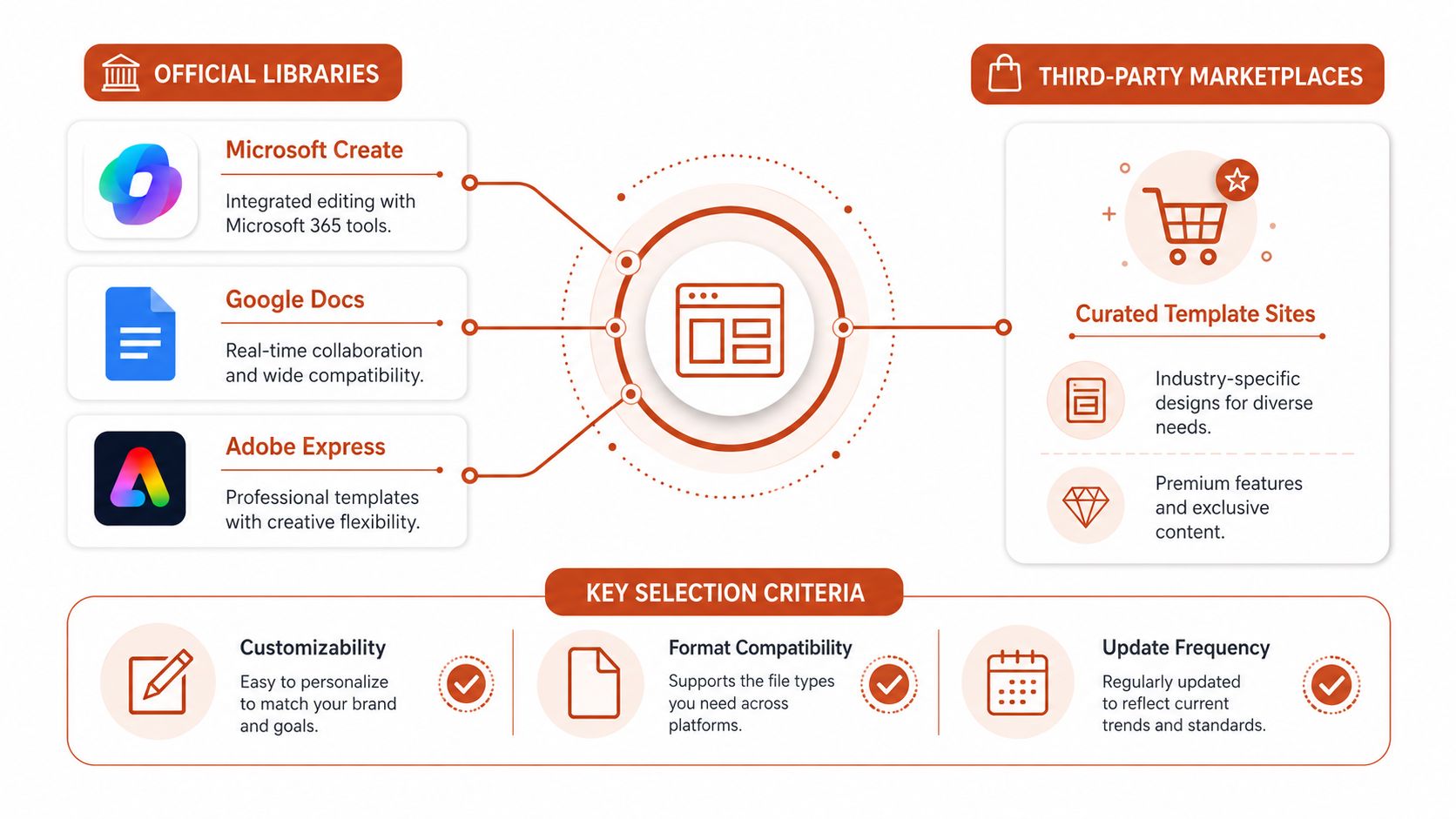
Start with the official library for the tool you already use. Microsoft Create, Google's template gallery, and Adobe Express all give you editable starting points that are safer than a random download page.
Third-party libraries help when the work is more specific. Template catalogs, Smartsheet, and trade-association resources often include layouts built for field service, design, or consulting jobs. Etsy and Creative Market can be useful if presentation matters, while paid systems from providers like FreshBooks and Bonsai fold templates into broader billing tools.
If you want to see how a library can be organized around quote-to-invoice work, AurenWell templates is a useful reference point. It shows a template set built around the way solo operators move from estimate to bill.
Free files can carry hidden macros, ask for an email before download, or arrive with watermarks that make them feel unfinished. Some also include tax fields built for another jurisdiction, which leaves you deleting half the form before you can send it.
The quickest test is practical: download two or three candidates, open them in your preferred app, and run one real job through each. Keep the master copy in a dedicated folder and protect it from casual edits. That avoids the usual problem where a client asks for the latest version and an old draft turns up instead.
Customizing Your Template for Solo Service Businesses
A generic template only becomes useful when it matches the way you sell. That means changing not just the logo, but the fields that reflect how the work is priced, approved, and handed off.
Fit the template to the service type
Home-service operators usually need labor hours, material markup, trip charges, and permit fees visible on the page. A handyman template from this estimate library is a good reminder that the job site, labor line, and materials line often matter more than polished design.
Creative work needs different language. Add revision rounds, usage rights, and licensing terms in the description column so the client sees what the fee includes. Fitness pros may want session packages, single-session versus bundle pricing, and cancellation windows. Consultants usually do better with hourly rates, retainer blocks, and expense reimbursement lines. Tutors often need subject, grade level, session length, and travel or platform fees.
Practical rule: if a client can buy the wrong thing because your template is too vague, the template needs more fields, not a prettier font.
Universal edits matter just as much. Replace placeholder logos, update payment terms to match the kind of client you serve, add a deposit field if you collect one up front, and include a signature line with date and clear acceptance language. A short validity statement keeps the quote time-boxed so the file doesn't drift into a stale promise.
| Service Type | Key Custom Fields | Notes |
|---|---|---|
| Home services | Labor hours, material markup, trip charge, permit fee | Useful when labor and site conditions vary |
| Creative work | Revision rounds, usage rights, license term | Protects against endless revisions |
| Fitness | Session packages, cancellation window, bundle price | Helps separate one-off and recurring work |
| Consulting | Hourly rate, retainer block, expense reimbursement | Keeps scope and billing method clear |
| Tutoring | Subject, grade, session length, travel or platform fee | Makes the offer specific and easier to approve |
Save the customized file as your master version, then duplicate it for each client. That keeps one clean template at the center of your workflow and prevents accidental edits from spreading across old jobs.
Converting an Approved Estimate Into a Final Invoice
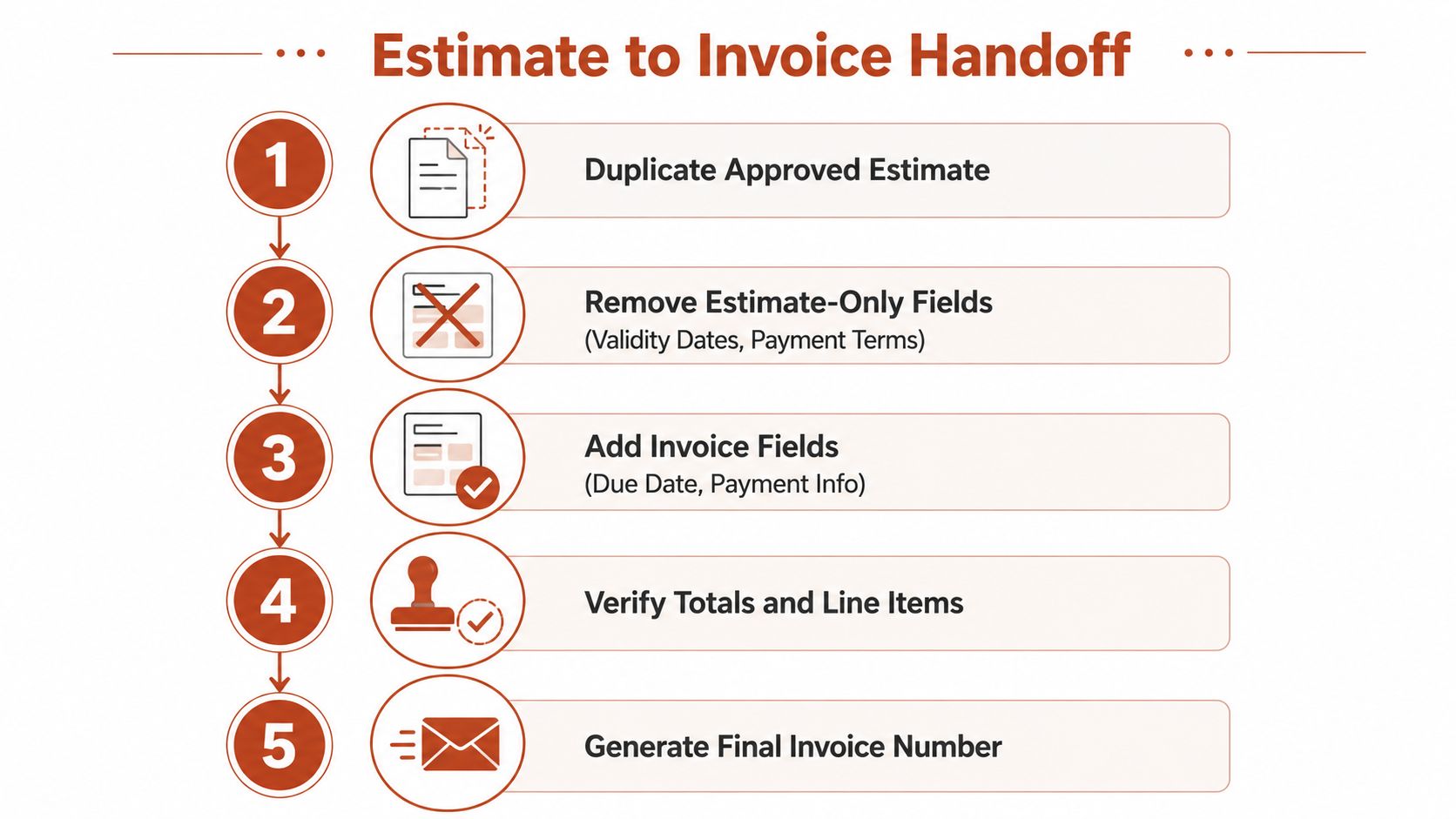
The handoff should be a data transfer, not a rewrite. Start with the approved estimate, duplicate the file, and swap estimate-only fields for invoice-only fields so the billing record stays traceable.
The line items should carry over exactly as approved, including descriptions, quantities, unit rates, and tax logic. Then add the invoice number, invoice date, and payment due date, and show the deposit as a credit line rather than hiding it inside a total. That makes the math easier to audit and gives the client a clear view of what's left.
When the estimate-to-invoice flow lives in a spreadsheet or a browser-based system, the safest setup is to define which fields auto-fill and which need manual edits. Deposit math belongs in one place, not spread across note fields or calculator shortcuts. That's what keeps retyping from becoming the source of billing errors.
AurenWell's estimate workflow is built around quote, approval, and conversion into an invoice in one flow, which is useful if you want the file handoff and payment step to stay connected in the same record estimate and invoice workflow help.
Handling Scope Changes Without Rewriting the Template
Static templates break when the client adds one more item and nobody writes it down. The fix is not a fresh blank document every time, it's a Change Order or revision section built into the estimate itself.
Build the change process into the form
Keep the original line items visible, then add a dated change log and a recalculated total that shows the delta from the prior approved version. Include explicit exclusions and a clause that says work beyond the original scope requires written approval at agreed rates. That way the client sees that additions are billable instead of assuming they're included by default.
A validity window belongs here too. Neutral guidance recommends time-boxing the estimate so pricing doesn't float indefinitely, and the same idea supports 14 to 30 day windows when you want the client to act before conditions change scope and validity guidance. If materials move, labor shifts, or scheduling drags out, the window gives you a clean boundary.
For solo operators handling many estimates, this changes the template from a price sheet into a pre-authorization record. When a client asks for one more thing on site, you point to the change field and update the document instead of rebuilding it from scratch.
If the change isn't written into the estimate, it's not part of the deal.
That single habit reduces a lot of follow-up arguing. It also makes the final invoice easier to defend because the approved version and the extra work are both documented in one place.
Pre-Send Checklist for Every Estimate You Send
Before you hit send, run a fast check on the file itself. A few minutes here saves a lot of back-and-forth later.
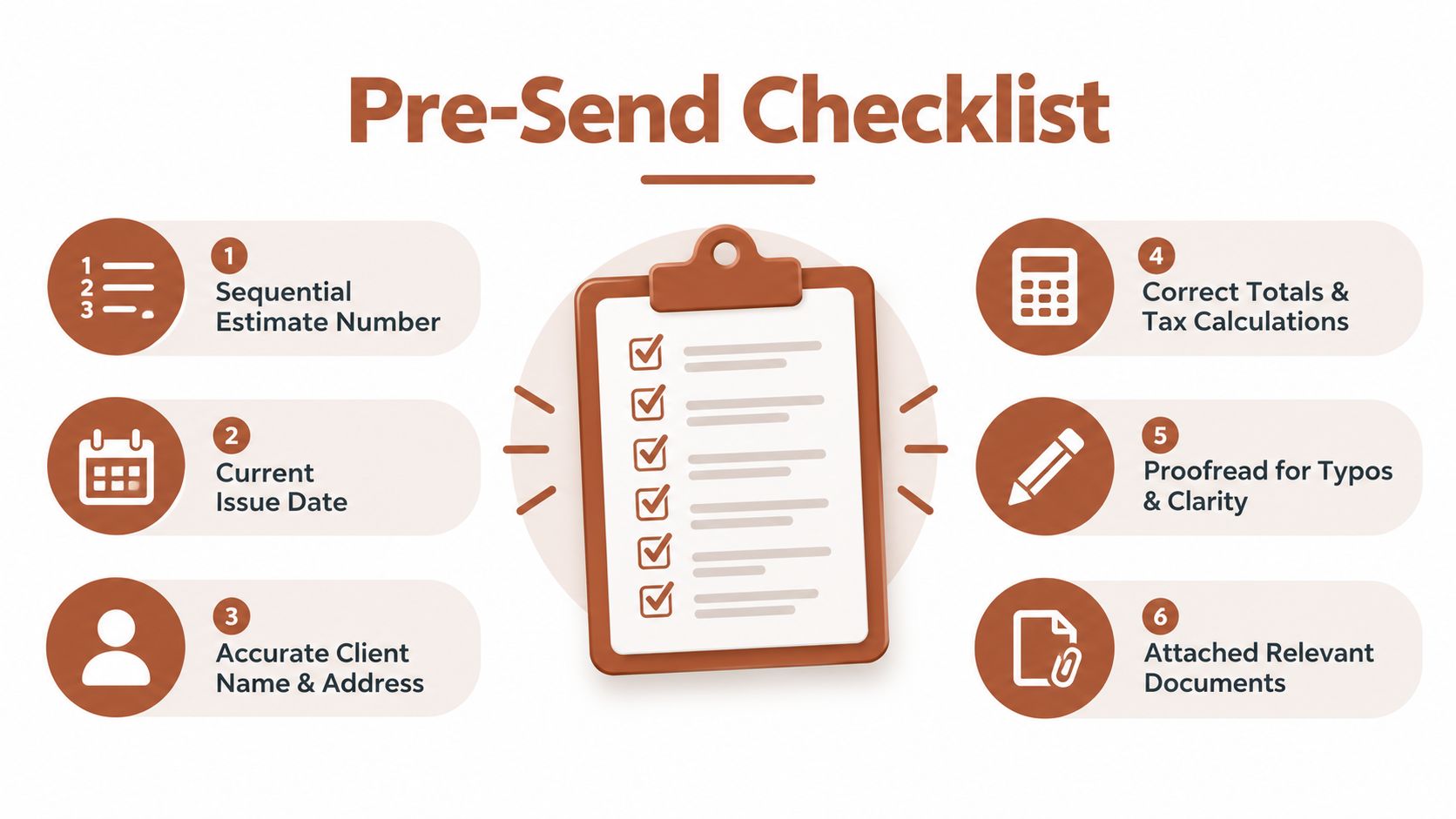
- Check the number first. Make sure the estimate follows your sequential system.
- Confirm the issue date. It should reflect the current send date, not an old draft.
- Match the client details. Name, address, and email should align with the inquiry.
- Review the math. Subtotal, tax, and grand total should calculate cleanly.
- Read the wording aloud. Vague phrases like “miscellaneous labor” invite confusion.
- Attach supporting files. Specs, photos, and notes should travel with the estimate as PDFs.
The point is simple. If the document can't stand on its own in a crowded inbox, it isn't ready yet.
When a Static Template Reaches Its Limits
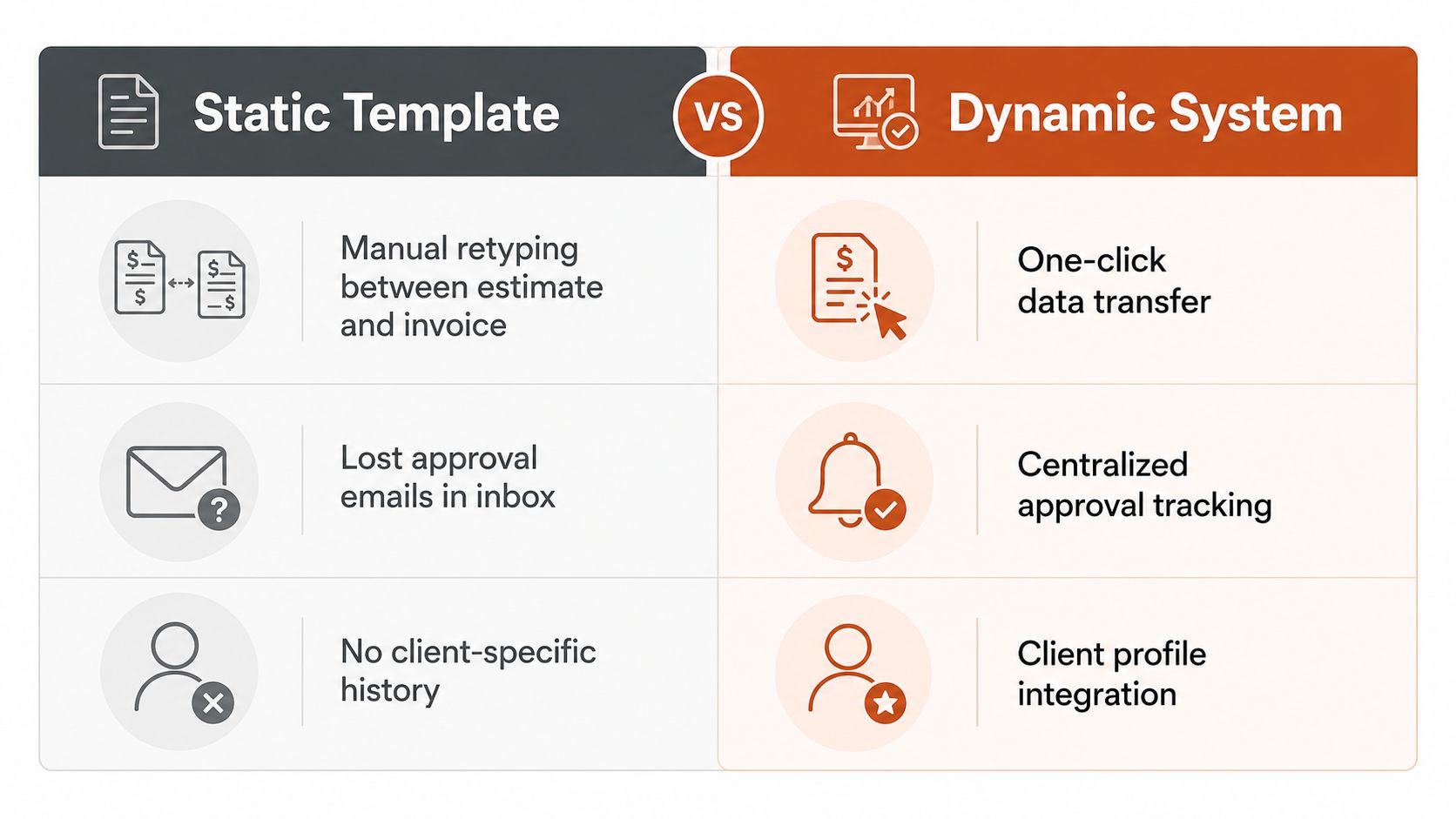
A polished PDF looks good until the workflow starts bending around it. Manual retyping between estimate and invoice, lost approval emails, and spreadsheet-based deposit tracking all create places where mistakes can hide.
A static template also makes it hard to enforce the same approval and payment process every time. One client signs fast, another leaves the estimate sitting in a thread for a week, and now the record is split between email, the document, and your notes. A dedicated workflow can keep the approval link, the document history, and payment status in one place, while a template can't do that on its own.
That's where a tool like AurenWell fits naturally, because it connects estimates, approval, deposits, and invoices in one client record. The practical difference is less retyping and fewer chances for the wrong version to become the live one.
If your current process already relies on a master file, a PDF copy, and manual follow-up, you're close to the edge of what a static template can handle. If your estimate needs one-click conversion, client approval, and payment tracking without digging through email, the document has outgrown the template.
Quick Reference Recap and Key Takeaways
The format should match the job. Word and Google Docs work well for short, narrative estimates. Excel and Google Sheets fit pricing-heavy work with formulas, and PDF is the locked send format once the content is final.
The core fields are essential. Use a clear header, document title, sequential number, issue date, valid-until date, client block, line items, totals, payment terms, approval area, exclusions, and an internal reference. Those fields do the boring but critical work of making the document traceable and enforceable.
Customization is where the template starts paying rent. Home services, creative work, fitness, consulting, and tutoring all need different line items and language, so don't force one generic version to do every job badly. Save a clean master copy, then duplicate and adapt per client.
The handoff matters as much as the quote. A good estimate invoice template turns into the final invoice without retyping, and a built-in scope-change section keeps the document defensible when the job changes. That's the difference between a price sheet and a pre-authorization record.
If you want an estimate and invoice flow that's built for one-person service businesses, AurenWell keeps the quote, approval, deposit, and invoice in the same workflow. It's a practical fit when you're tired of retyping the same job twice and want a cleaner handoff from signed estimate to paid invoice.