
You finish the job, load the tools, and the van smells like rain, dust, and the last bit of sealant. Then your phone lights up with a client asking for the estimate again, while your bank balance still shows yesterday's stress because the deposit hasn't landed and the invoice lives in a spreadsheet named something close to the project, but not quite. That gap, between work done and money collected, is where solo businesses lose time, and sometimes lose the payment altogether.
Estimate and invoice software exists to shrink that gap. Not by making paperwork prettier, but by connecting the quote, approval, payment request, and follow-up into one clean sequence. For a one-person service business, that sequence matters more than a fancy dashboard.
The Moment Between Finished Work and Paid Invoice
The mess usually starts after the client says yes. Your estimate is somewhere in email, the work order is in your notes, and the invoice draft is sitting in a template with half the client details copied over from the last job. If you've ever searched three folders for one missing deposit line, you already know the problem isn't billing, it's the handoff.
That handoff is where solo operators bleed time. A job can be finished in an hour, then take days of scattered follow-up because the estimate lives in one place, the invoice in another, and the payment request in a third. The work itself pays you once. The admin around it keeps charging you.
Estimate and invoice software is built for that exact messy middle. It turns the closeout sequence into one connected record, so the accepted quote becomes the invoice instead of becoming another document to rebuild. That's the whole point, less scavenger hunt, more getting paid.
Practical rule: if a tool doesn't shorten the gap between approval and payment, it's decoration.
The market size backs up how central this category has become. The billing and invoicing software market is projected to rise from USD 11.27 billion in 2024 to USD 22.14 billion by 2034, with a 6.98% CAGR during 2025 to 2034, and another estimate places the segment at USD 12.64 billion in 2025 market research future. That's not a niche utility anymore. It's infrastructure for people who need faster billing, cleaner approvals, and fewer missed payments.
What Estimate and Invoice Software Actually Does
Think of an estimate as the professional handshake. It sets the price, the scope, and the expectations before anyone starts work. The invoice is the receipt and the payment trigger after the job is done. They're related, but they do different jobs.
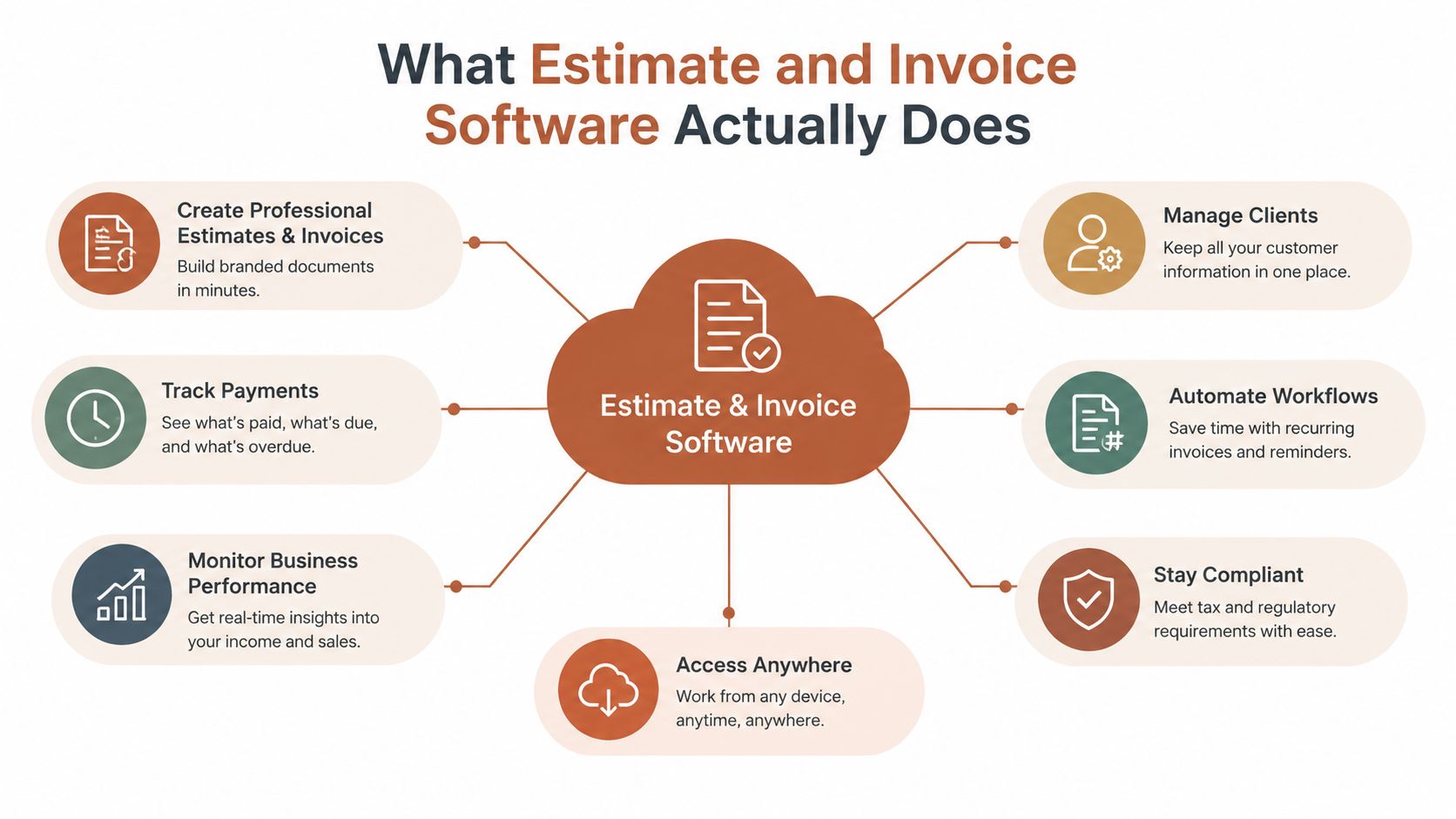
The reason solo operators struggle with separate tools is simple. A Word doc for estimates and a spreadsheet for invoices means you retype client names, addresses, line items, taxes, and totals every time the document changes hands. Every re-entry is another chance to mistype a phone number, forget a line, or send the wrong version.
Combined software stores the reusable pieces once. Client records, services, taxes, payment terms, and document history stay attached to the same file, so an accepted estimate can turn into an invoice without rebuilding the whole thing. That's the efficiency lever, not templates, not color schemes, not a slick homepage.
If you want a quick look at how a practical tool handles those document types, browse Freshbooks apps for business and compare the workflow with what you're doing now. Don't get distracted by the marketing language. Check whether it keeps the estimate and invoice tied to the same client record.
The history of the category matters here. Electronic invoicing goes back to the 1960s with EDI, and industry histories point to 1965 as the year the first e-document or e-invoice was sent Qvalia. European rules then pushed e-invoicing forward again with Directive 2001/115/EC in 2001 and Directive 2014/55/EU in 2014 Qvalia. Modern estimate and invoice software sits on top of that long standardization path.
Core Features That Actually Shorten Time to Paid
Most feature lists read like a wish list written by someone who's never chased a late invoice. I judge tools with one question, does this move the money into my account sooner, or does it just look tidy in a demo?
| Feature | Effect on Time to Paid | Verdict |
|---|---|---|
| Saved client details | Cuts retyping and avoids errors | Useful, but only if it feeds the next step |
| Product and service libraries | Speeds estimate creation | Helpful, but not enough on its own |
| Estimate-to-invoice conversion | Removes rebuild time after approval | High impact |
| Payment links | Reduces friction at the moment of payment | High impact |
| Automated reminders | Replaces awkward manual follow-up | High impact |
| Deposit and milestone requests | Pulls cash forward | Strong for service work |
| Mobile approval | Lets clients sign while the job is still fresh | Very useful in the field |
| Multi-currency and tax handling | Prevents billing mistakes | Good for complexity, not speed |
| Advanced reporting | Gives numbers after the fact | Usually a dashboard nice-to-have |
| Team permissions | Helps larger crews | Overkill for most solo operators |
The three features that consistently matter are estimate-to-invoice conversion, payment links, and automated reminders. Those are the ones that compress the collection cycle instead of just organizing it. The rest can be valuable, but they don't move cash flow unless they feed the core sequence.
Field note: a feature that saves you ten minutes once a month is not equal to one that saves you a day every week.
Mobile approval deserves a special mention because one-person service businesses often finish the work before they get back to a desk. If the client can review and sign on the spot, you don't spend the next morning trying to recreate the conversation from memory. For a practical example of how estimate handling is presented in a product, see AurenWell's estimate features and compare that flow to your current process.
The Estimate to Invoice Workflow Step by Step
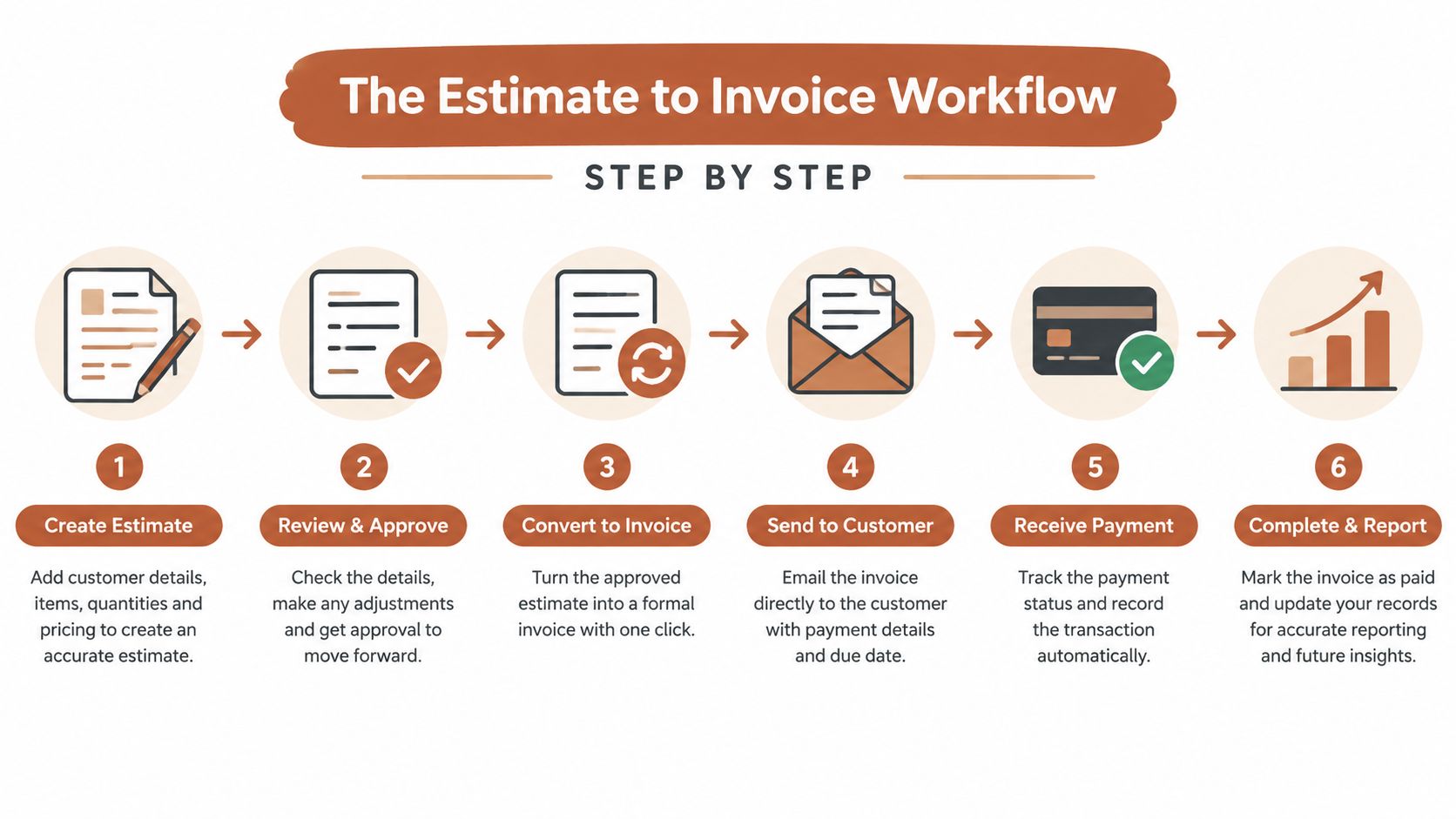
A sane workflow starts with the estimate already carrying your saved services, pricing, and tax rules. You choose the line items, add scope notes, and send it before the lead goes cold. The best systems let you use templates without forcing you to rebuild the whole quote from scratch.
Once the client approves, the signature and status stay attached to the same record. That matters because the estimate isn't a separate artifact anymore, it becomes a machine-readable approval state. You're not checking email, then a PDF, then a separate note to see what happened.
The next step should be one click. The accepted estimate converts into an invoice with the descriptions, quantities, and prices intact, and the invoice can reference the original quote without you retyping anything. That's where the admin burden drops hard.
If the platform supports payment links, you send the invoice and the client pays from the same screen. Partial deposits can be logged against the same job, which keeps you from chasing separate records in a spreadsheet. If you want a deeper look at automating this handoff, save time on invoicing with Snyp offers a related workflow angle.
Then comes status tracking, sent, viewed, approved, paid. Those labels sound small, but they're what keep you from guessing whether the invoice vanished or the client just hasn't opened it yet. A good system stores the receipt, the approval, and the payment against the same client record, so reconciliation isn't a detective story.
How Payment Links and Reminders Change Cash Flow
Payment links cut the distance between “I got your invoice” and “I paid it.” That sounds obvious until you remember how many invoices still force the client to log into a portal, find the invoice, and figure out what to do next. Every extra step gives them time to drift.
Wave's anonymized analysis of more than 300,000 U.S. microbusiness owners found that invoices with embedded payment features were paid on time 15.4% more often in 2021 Wave study. That doesn't mean every business will see the same result, but the mechanism is clear. Less friction at the point of payment means fewer abandoned invoices.
Automatic reminders do different work. They take the uncomfortable follow-up off your plate and make it consistent, which is exactly why they matter for solo operators who hate chasing money. The stronger reminder systems are timed, polite, and attached to the invoice itself instead of living in your memory.
You also want deposits on the estimate, not just the invoice. Deposits pull cash forward and screen out clients who were never serious enough to commit. For field work, that's often the difference between starting a job with confidence and financing the client's indecision.
See how online payment handling is presented in AurenWell if you want to compare the checkout flow itself. That's the part that decides whether a client pays immediately or puts it off until later.
Why Narrow Tools Beat Accounting Suites for Solo Operators
A solo operator doesn't need a full accounting suite to send a quote this afternoon. General ledger setup, depreciation rules, payroll logic, and batch accounting features are useful in the right business, but they slow down a one-person service shop that mainly needs to bill, collect, and move on.
| Criteria | Narrow Estimate and Invoice Tools | Accounting Suites | CRM Platforms |
|---|---|---|---|
| Time to first invoice | Fast | Slower setup | Usually indirect |
| Mobile use in the field | Strong fit | Mixed | Built for sales workflows |
| Admin complexity | Low | High | Medium to high |
| Focus | Quote, invoice, payment | Full finance system | Lead and pipeline management |
| Cash-flow usefulness | Direct | Indirect | Often secondary |
Accounting suites tend to ask you to learn their language before you can bill a client. CRM platforms often treat the invoice as a side effect of the sales process, which is backwards for a solo service business. You need the money path first, not the pipeline theater.
The category split matters even more when the work happens away from a desk. A narrow tool loads faster, shows fewer choices, and gets you from estimate to payment with less setup. That's exactly why a mobile-first workflow can feel more practical than a broad platform designed for larger teams.
If you're looking at a product like Mercateer's AI receptionist for property management, keep the same rule in mind. Good automation is the kind that hands off a real business task without forcing you into an enterprise workflow you don't need.
A Solo Operator Checklist for Choosing the Right Tool
Use this as a blunt pass-fail filter. If a tool can't clear these basics, don't waste time on the demo.
- Pricing transparency: Is the pricing flat and obvious, or does it punish you with per-invoice charges as your volume grows? Hidden usage costs make the tool more expensive right when you're trying to scale.
- Mobile approval: Can a client review, sign, and accept from a phone without installing anything? If not, you'll keep losing momentum after the job is already done.
- Data export: Can you get your client and document data out in open formats? Lock-in is a problem the day you want to switch, not the day you sign up.
- Refund or cancel-anytime terms: Is there a clean exit if the tool doesn't fit your workflow? A low-risk trial matters when your cash flow is tied to the software working right away.
- Payment fee treatment: Are payment fees passed through clearly, or buried in a bundle? You need to know the actual cost of collecting money, not the headline subscription.
Score each yes as 3 points and each no as 0 points. Anything that lands below the middle on pricing clarity, mobile approval, or exportability should be dropped immediately. Support response time is worth asking about before you pay, because a billing tool that breaks on a Friday afternoon is not a minor inconvenience.
Watch for fake “unlimited” marketing too. Some plans brag about unlimited clients, then limit reminders, exports, or payment features. That's the kind of fine print that hurts solo operators, because you only notice it when a payment is already late.
Running a Real Estimate Through Your Shortlist
Pick two finalists and run the same job through both of them. Use one estimate you've already done, not a hypothetical, and see how long it takes to recreate the workflow from quote to paid invoice.
Measure three things, nothing else. First, the minutes from estimate creation to client signature. Second, the seconds it takes to convert that accepted estimate into a numbered invoice. Third, the gap between invoice sent and payment cleared when you use the default payment link and reminder settings.
Then compare the output, not the feature list. If one tool makes the handoff smoother, the payment gets requested faster, and the client can act without extra messages, that's the one that helps your business. For a simple template you can mirror during the test, review this estimate and invoice template guide and use it as a practical benchmark.
The winner is the tool that compresses the estimate-to-paid loop the most. For a solo operator, that's the only score that matters.
If you're still managing estimates in one app, invoices in another, and reminders in your head, stop comparing feature checklists and test the workflow that pays you. Pick two tools, run one real job through each, and choose the one that gets money into your account with the least friction.